



Starting from the GLPI version 9.3 version rack management feature was integrated to the system’s core. Improvements in its design were also made, giving a more realistic touch to the items when assembled, giving us the possibility of having something similar to the following image:
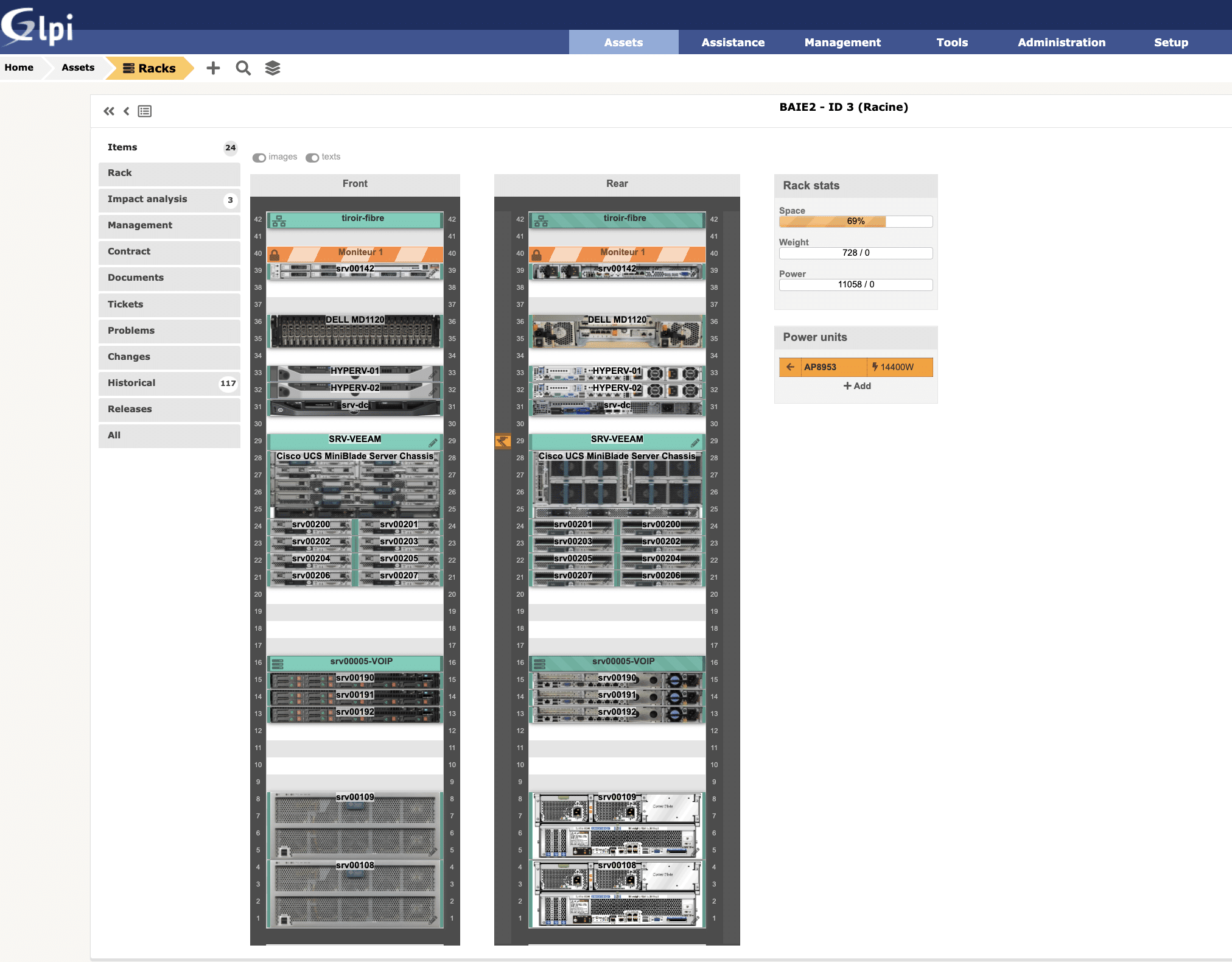
Assembled rack in the GLPI’s rack management module.
Like every other thing in GLPI, the racks are basically configuration items that can be added and managed inside the system.The biggest difference, in this case, is that the management goes further and allows us to have the graphic vision of how the configuration item is developing.Although having the true and graphic vision of the configuration item’s representation isn’t mandatory in any standard, the possibility attracts users who likes to know how the services are being delivered and also facilitates the decision making for analysts and managers
What’s a rack?
Racks are structures, normally made of steel to accommodate IT equipment such as servers, switches, cable panels, among others.They have an importance both from the aesthetic point of view, making everything more beautiful and organized, as well as safety-wise, making IT assets inaccessible to people with access to the same environment as the rack.
Why use a rack?
Racks are used to help organize and also protect the physical structure of the IT components, whether it’s assets (equipment) or liabilities (structured cables).It can also have distinct purposes in a organization, or even mixed, depending on each necessity and capacity:
- Hold network servers;
- Telecom equipment;
- Network assets such as switches, routers, wifi controllers, among others;
- Telephony equipment;
- Structured cabling;
- Or even a mixture of some of these items or all of them at once.
In bigger organizations, it is common to have multiple racks, one designed for each function.
- Telecom racks;
- Server racks;
Since they have a bigger footprint, purchasing power and infrastructure’s complexity level, they segregate their resources in order to elevate the safety and management levels.
These are the two most popular types of racks in the market:
- Floor rack: Rack with feet to be installed on the floor;
- Wall rack: Rack without feet to be installed on a wall by its inferior part with the use of fastening screws and bushings.
Of course, there are other types of racks such as two-door floor rack, with side doors, and many more characteristics. But it’s up to each organization to know to what level to spend resources to manage the asset’s characteristics.
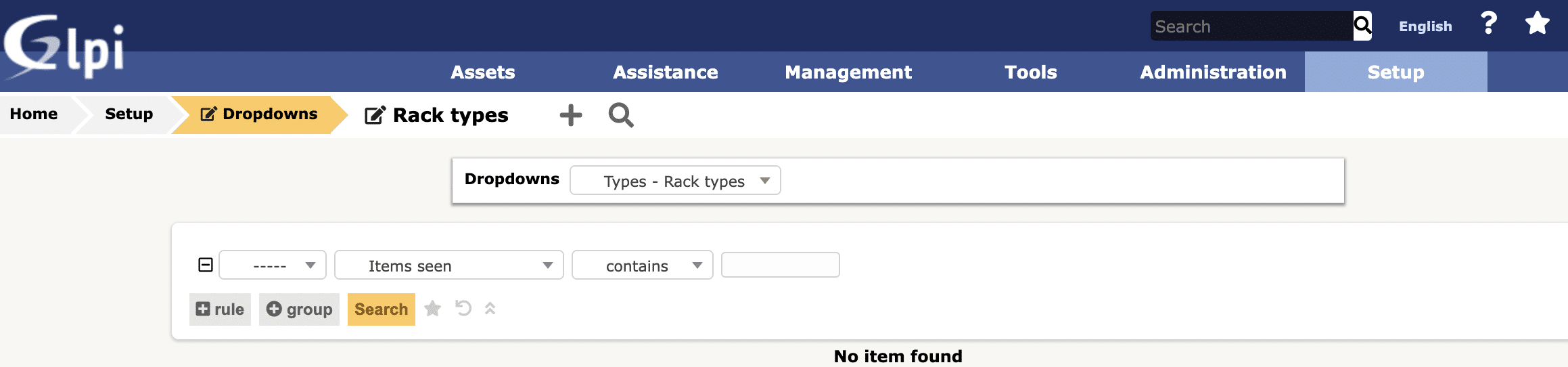
To create rack types on GLPI, you must proceed as follows:
Step 1: Access “Setup > Dropdowns > Types”Step 2: In the session “Types”, look for “Rack types” and click in its linkStep 3: Click on “ Add a new item” and register your new rack type.
What assets do can you place on racks?Beyond the network and server assets, the racks also tend to accommodate accessories, which are called liabilities.The most used and, consequently, most known liabilities are:
- Patch panel;
- Cable guide;
- Blind cover;
- Tray.
> Patch panelCable panels or Patch panel as they are popularly known in the technical niche, are panels used for the arrival of structures cabling, having connection sockets in the RJ45 standard to provide the connection of Terminal Points (which arrive via structured cabling) to other network devices inside and outside the rack.For the interconnection of the devices, whether assets or liabilities, small cables of variable sizes are used, which are known as Patch Cords, as the images above and below represent:> Cable guideThe cable guides help us organize the patch cords inside the racks, so that the rack doesn’t look like “drained noodles”, a very common term for when the cables are loose and unorganized.> Blind coverThe blind cover has the goal to block the view of the rack’s interior. It is an interesting item to keep the rack beautiful and organized.> TrayUsually, we have assets such as small routers, carrier modems or devices such as midia converters that we need to put in the rack for safety and even convenience reasons.The fact is that these devices don’t have 19’’ of width and so they can’t be conventionally fixated on the rack. Therefore, we need a special resource to keep them organized.This resource is the tray.There are various types of trays:
- Fixed: after the installation, movement isn’t allowed;
- Slider: they have lateral slides/tracks, allowing movement to the outside of the rack.
It’s also common to buy trays that occupy only half of the rack’s depth, enough to serve us for specific use and a limited amount of equipment.
Creating network devices on GLPI.
Starting from GLPI 9.5 version it is possible to create network devices in the system. To do so, please, follow the instructions:Step 1: Access path “Assets > network devices”Step 2: Click on “Add item”Step 3: Register the network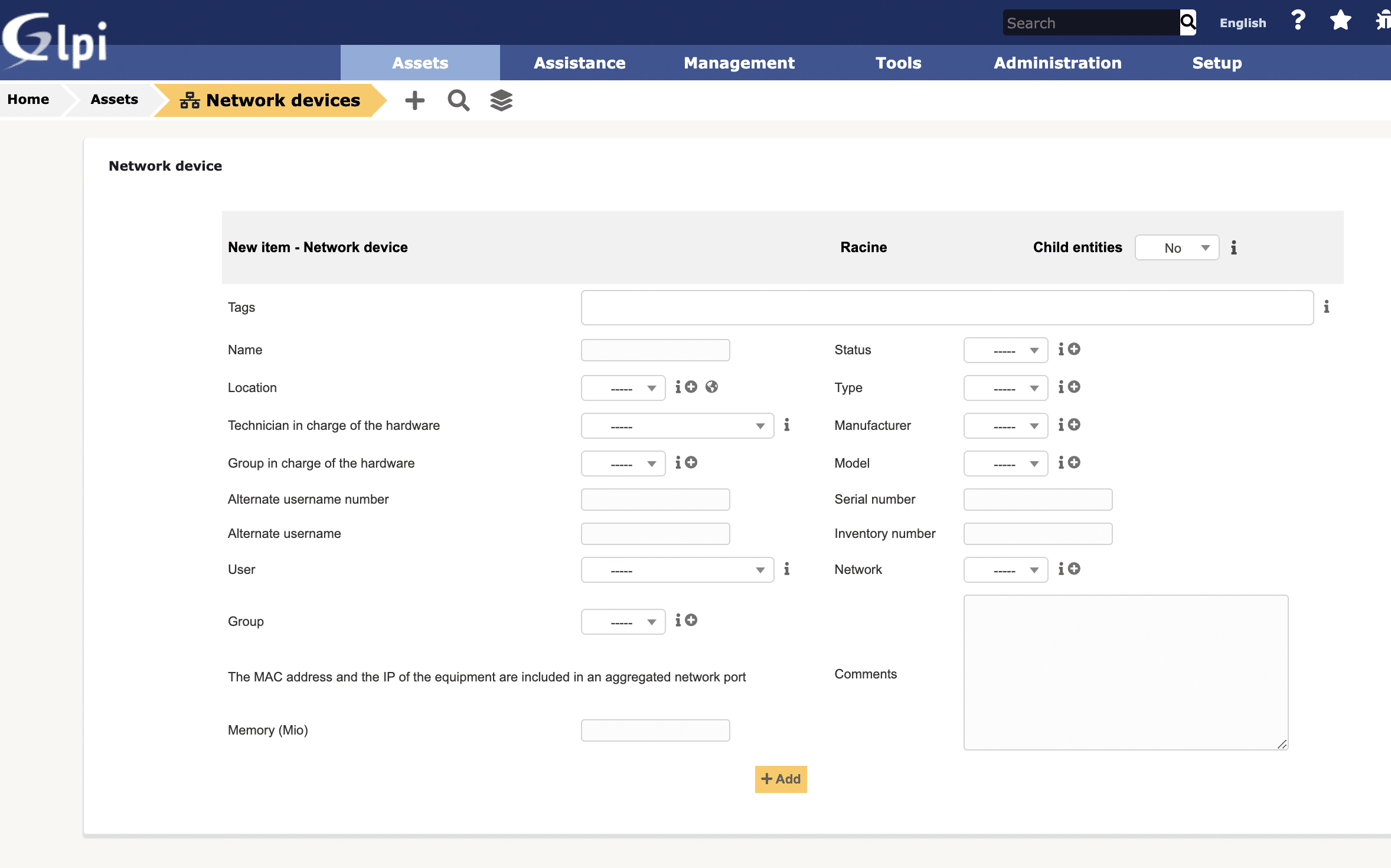
Commonly used assets on racks:
What we’ve seen so far were just configuration items of the liability type. Now, we will quickly see the main assets:
- Switch
- Server
- Cortafuegos
- UPS
> Network switchSwitches allow the interconnection of lots of devices via network, such as computers, routers, servers and others that use network connectors. We won’t get into types of network connectors in this article. It’s already going further than I thought it would earlier today.> ServerRegarding servers, the market supply is as diverse as possible. We have cabinets of various models. But what interests us in this moment are the following:
- Rack server: appropriate cabinet to use on racks
- Micro server: a small server developed by HP for micro organizations.
About the rack servers, what we can add is that they have several sizes, both in height (measured in U, as we’ve already seen) and depth (it’s necessary to check if the rack also has enough depth). In some rare cases, the server itself doesn’t have 19’’ of height, but comes with mounting accessories that allow its use and correct fixation in the racks.> FirewallFirewalls are items found commonly on racks. That’s exactly where they tend to operate: the edge of the networks!Today, we’ve been finding a range of firewalls on the market varying in manufacturers, models, sizes or even type:
- Physical:
Box bought with the manufacturer;Software installed in server hardware.
- Logical:
Running it in a virtual machine inside the server.What interests us here is only the physical, sold in a standard cabinet from the manufacturer and most of the time, installable on racks.> UPSOur next item is the UPS. It’s responsible for ensuring a certain continuity of equipment operation when there is a failure in the power supply.There are several equipment models and shapes, but these details don’t fit in this post. What interests us is just the affirmation that some models are proper for installation on racks.>Ruler, the must-have itemAnother item that you must have is the electric ruler, which is no more than a Power Distribution Unit. On GLPI, it is called PDU (Power Distribution Unit). The rulers have the function to distribute energy to the assets installed on the rack.There are several types, outlet quantities and resources, such as monitorable via network using the SNMP (Simple Network Management Protocol).
Creating PDUs on GLPI.
Since the 9.3 version, GLPI comes with the native possibility of registering PDUs in the system.This registration can be done with the following procedure:Step 1: Access “Main menu > Assets > PDUs”Step 2: Click on “Add items”Step 3: Add your PDU with its proper characteristics
Assembling racks on GLPI.
With GLPI we can assemble an image of our racks using the items we have in our configuration base and then have a great level of management over these items.
Adding a rack on GLPI
To create a rack, just access the system in “Main menu > Assets> racks”.Now, just click on “Add” to create your first rack on the system.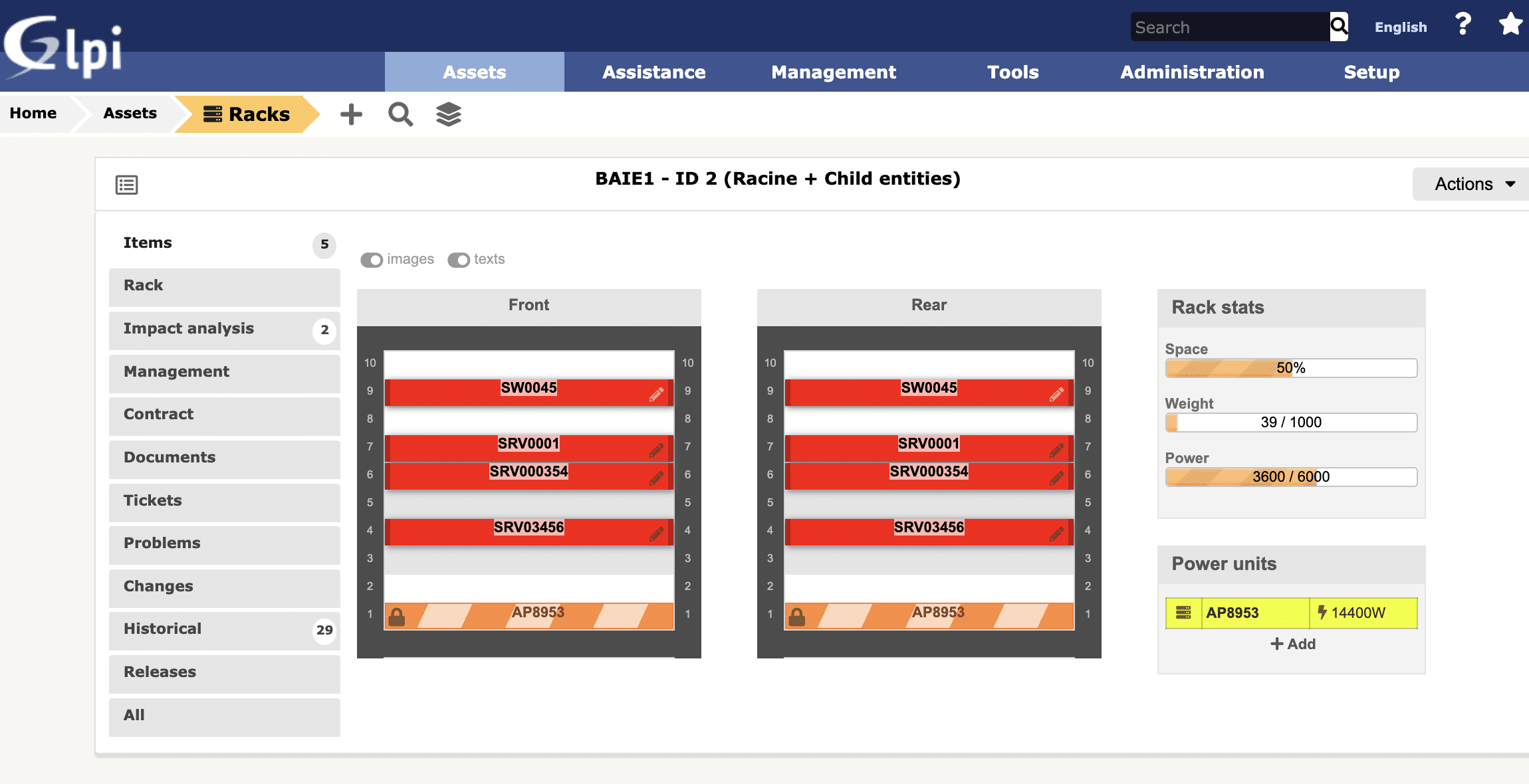
Data of the rack
After the rack’s registration, it will be available for us to “decorate” however we want.
Adding items to the rack on GLPI.
In order to provide a better experience, we’ll demonstrate the configuration of some of the items mentioned in this post.The first item we’ll add is the UPS. This equipment, as mentioned above, is heavier. Therefore, we’ll install it at the position 1 of the rack, leaving most of the weight concentrated in the inferior region of the rack.For that, just click at the center of unit 1 of the rack at the “plus” sign that appears when we pass the computer mouse over this region: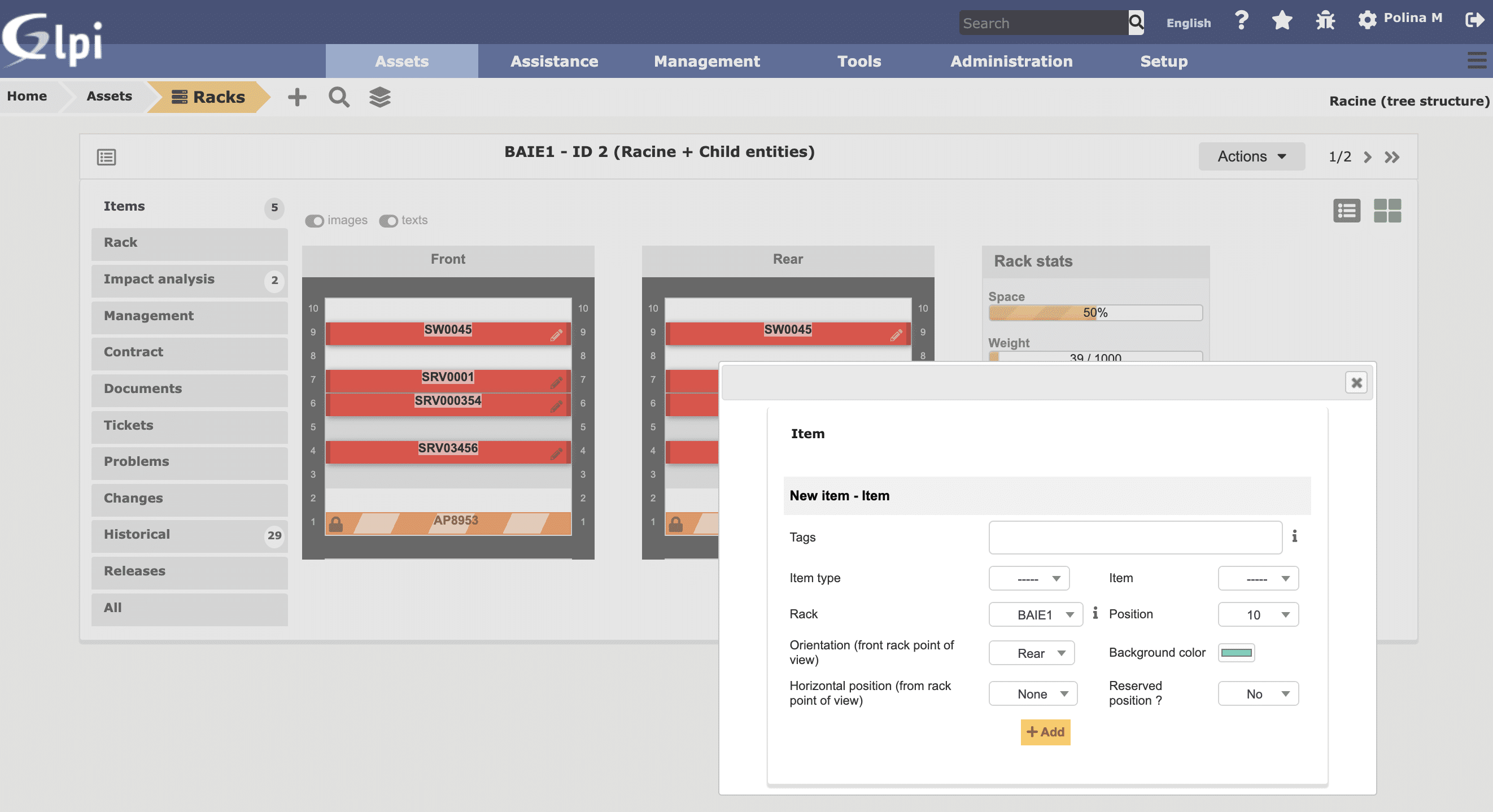 A modal will open asking what kind of item we want to insert in the rack.The asset classes allowed for use by GLPI are:
- Computer
- Monitor
- Network devices
- Generic devices
- Chassis
- PDUs
- Liability devices (Thank God the plug fell for the insertion of these items)
While selecting any of the classes, GLPI will list the assets for us to select one and install on the rack.After selecting the item, just click on “Add” and then you’ll have your asset installed.
You can proceed adding items to your rack.
Impact & Relationship management.
Starting from GLPI 9.5 it is possible to create dependencies connection between assets. Now you can see which assets will be affected in case of damage/problems/incidents.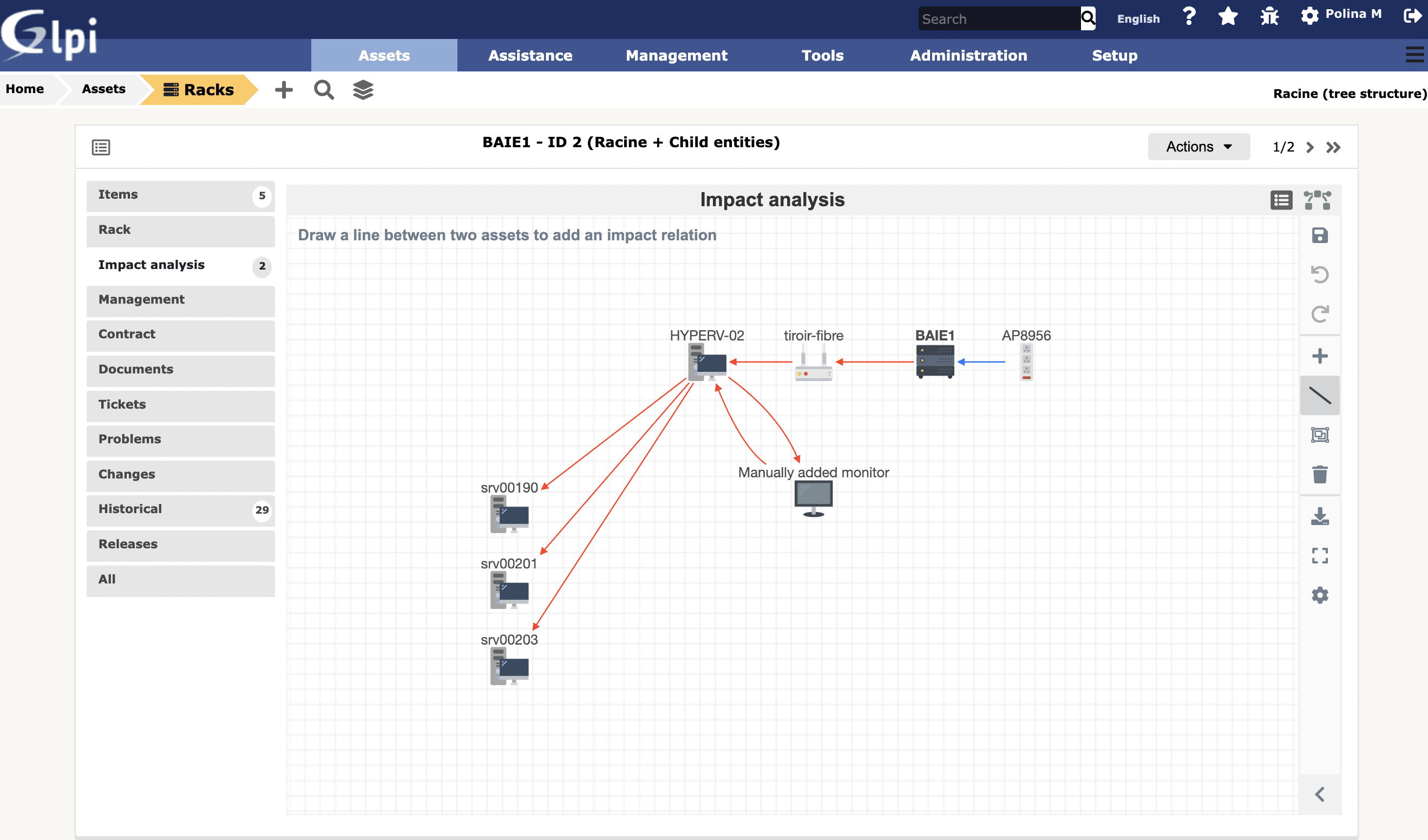
Ready to give it a try?
CREDITS:
- The article was written by Halexsandro Sales, CTO at Verdanatech and adapted for Teclib.
- Original version in Portuguese: click here.
- Translated from Portuguese to English by Laís Borges Dantas.
