

Contacto
Contacto
Mi cuenta
02.01.24

Elevate Your GLPI Experience with the Branding Plugin: A complete guide on how to change GLPI Logos

https://services.glpi-network.com/documentation/1565/file/README.md

If you’ve ever wanted to give your GLPI instance a unique touch by incorporating your logo and customizing the login page, you’re in for a treat. In this blog post and accompanying video tutorial, let’s walk through the first steps of using the Branding Plugin to elevate your GLPI experience — and your client’s too.

The Branding Plugin for GLPI is a powerful tool designed to enhance the visual appeal of your GLPI instance. It allows you to replace default logos with your own and create a more personalized login page without the need of copying and pasting files directly into the server’s folders.

This not only makes your GLPI instance visually distinctive, but also reinforces your organization’s brand identity.

ℹ️ The ‘Branding’ plugin is available for all the Basic GLPI Network subscribers and for all GLPI Network Cloud customers.

How to install the Branding Plugin

If you are, at least, a Basic GLPI Network Subscriber or a GLPI Cloud Network administrator, you can find the plugin named Branding on the Marketplace of your instance.

✅ The plugin is available for all Basic or above GLPI Network Subscribers and for all GLPI Network Cloud clients.

Step 1: In Setup > Plugins > Marketplace, search for Branding after choosing the Discover tab.

Step 2: Install and enable it.
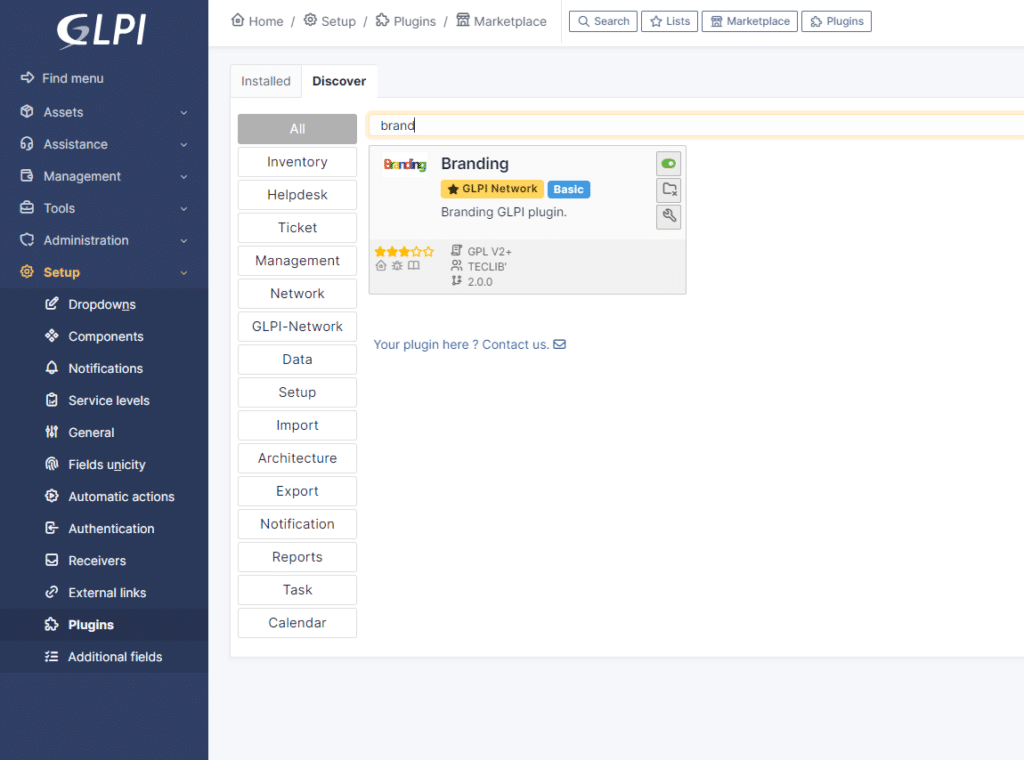
Step 3: Click on the tool icon below the Uninstall button or navigate through Administration > Entities > Root entity and look for the Branding tab
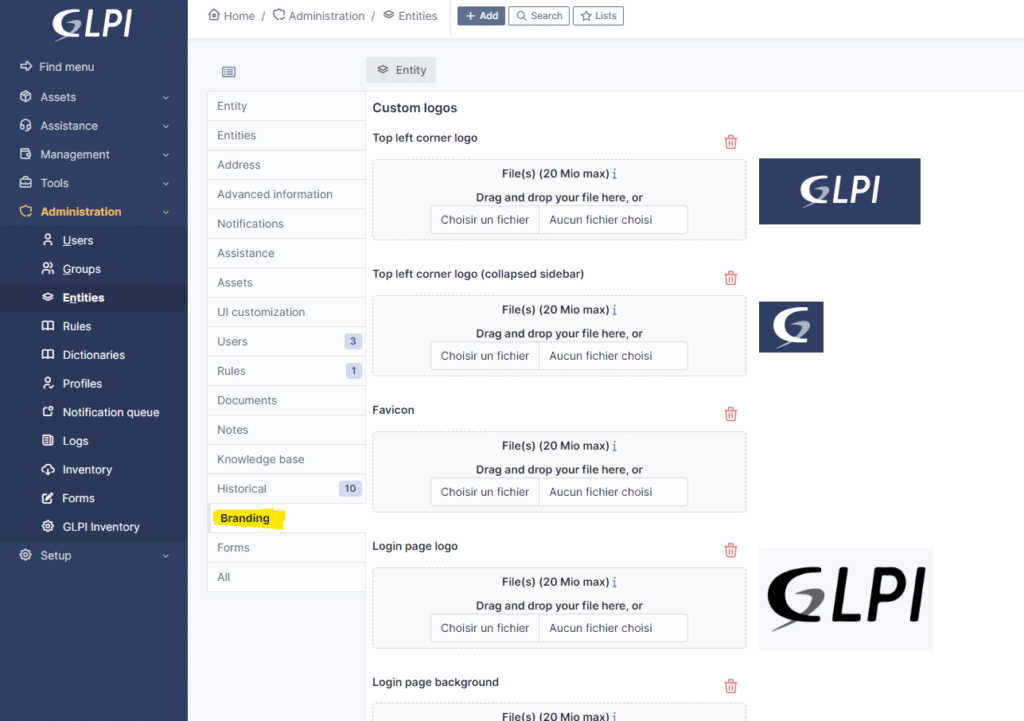
How to change GLPI login and top left logos

Step 4: Choose the files you want to replace the current ones.

  • Top Left corner logo - This can be changed according to the desired entity 
    • Default size: 100x55 pixels
    • It is the logo you see when your GLPI page is opened and the left sidebar is expanded.
  • Lop Left corner logo (collapsed sidebar) - This can be changed according to the desired entity
    • Default size 40x40 pixels
    • It is the logo you see when your GLPI page is opened and the left sidebar is collapsed.
  • Favicon
    • Default size: 16x16 or 32x32 pixels
    • It is the logo you see next to the page title at the beginning of your browser’s the tab.
  • Login page logo
    • Default size: 220x130 pixels
    • It is the logo you see before you log in. It appears with the fields to fill with your username and password
  • Login page background
    • Default size: It depends on the usual size of your screens. The bigger, the better. (Make sure not to surpass the maximum upload limit for files.
    • It is the image you can add as a background at the login page.

Getting Started

Getting started with "Branding" is easy. You'll find detailed documentation here: Plugin Documentation. Plus, you can explore this plugin in action on your GLPI Network Cloud demo instance.

This plugin is available via our professional offers ! From the level “Basic” in GLPI Network Subscriptions (on-premise), and to all of our GLPI Network Cloud customers.

Subscription and More Information

Find all the details about our subscription offers in this brochure: Subscription Brochure. For more information on GLPI Network Cloud, visit our site.

Join the Community

This plugin isn't just a tool; it's a community effort. We invite you to test it, provide feedback, and help us refine it to better serve your needs.

Stay connected, stay informed, and elevate your work experience with the "Branding" plugin. We're here to make sure you're always in the loop, no matter where your work takes you.

Video content

00:00 Intro

00:31 Installing the 'Branding' Plugin

01:23 Setting up the 'Branding' Plugin

03:47 How to set up a different branding to different entities

También te puede gustar estos artículos

01.07.26
Congratulations! We are pleased to announce our new Silver GLPI Network partner in Romania: Quartz Matrix. Quartz Matrix is a Romanian technology company focused on digital transformation for three key sectors: education, industry, and public administration. With deep expertise in IT&C, the company develops and integrates solutions spanning cloud computing, IoT, artificial intelligence, cybersecurity, and […]
01.07.26
On 23 and 24 June 2026, the GLPI team attended the CoTer Numérique Congress in Reims — one of the key annual gatherings for IT decision-makers in French local government. A stand at the centre of the conversation Set up at stand n°3 (Espace Parvis), the team spent two days meeting a broad cross-section of […]
30.06.26
GLPI was at VivaTech 2026, celebrating its 10th edition — the flagship global tech event in Paris — and this one delivered on every front. Set up at the We Are Normandy pavilion (Stand 2B59 – Hall 7.2), the Teclib' team spent three days building connections with institutional figures, large enterprise clients, local government representatives, […]
29.06.26
We are notifying the GLPI community of several security vulnerabilities identified in a number of community plugins. Updates are available and should be deployed promptly on all affected instances. Affected Plugins and Vulnerabilities The vulnerabilities identified cover a range of severity levels, including a critical Remote Code Execution (RCE) flaw in GenericObject (CVSS 8.9), multiple […]
25.06.26
On Friday, June 12, the whole Teclib' team came together in Caen, home to our technical crew, for the Teclib' Day: a packed day of half-year reviews, upcoming projects, and genuine team bonding. Morning: Half-Year Reviews at MoHo The day started at MoHo, a creative coworking space in the heart of Caen, over coffee and […]
24.06.26
Two new GLPI versions are available 11.0.8 and 10.0.26 releases fix several critical security issues that have been recently discovered. Update is stronglyrecommended! Many bug fixes have also been made, read the changelogs for more details: You can download the new archives on GitHub: You will find below the list of security issues fixed in theses bugfixes versions: […]
23.06.26
You can download it on the GLPI Agent github project: https://github.com/glpi-project/glpi-agent/releases/tag/1.18 This new version is essentially a security fix release for the following security issues: The release also includes few bug fixes: You can check changes details in the official online Changelog available here: https://github.com/glpi-project/glpi-agent/blob/1.18/Changes About packaging, here is what you should retain: This time, we strongly […]
17.06.26
We are pleased to announce our new Silver GLPI Network partner in Poland: OpenIT. OpenIT is a Polish IT services company dedicated to helping businesses and institutions run their technology reliably, securely and without unnecessary complexity. From helpdesk and server administration to cybersecurity, Microsoft 365, virtualization and cloud solutions, OpenIT provides end-to-end IT support tailored […]
10.06.26
Congratulations! We are pleased to announce our new Silver GLPI Network partner in Switzerland: Forfirm Consulting Sagl. Founded in 2014, Forfirm is a consulting firm specializing in ICT & Digital, Finance, and Governance, Risk & Compliance (GRC). With offices in Zurich and Lugano, the company operates at the heart of the Swiss business ecosystem, supporting […]
03.06.26
Congratulations! We are pleased to announce our new Silver GLPI Network partner in Japan: HOGO Japan . HOGO Japan provides IT support, system management, and digital operations services to businesses operating in Japan — including financial institutions, industrial companies, corporate offices, and customer-facing service businesses. With a strong focus on reliability and responsiveness, they help […]
02.06.26
We are pleased to announce the availability of the beta version of the Nutanix plugin for GLPI 10 and GLPI 11. This beta release is open to the entire GLPI community. Its goal is to let users test the plugin across a variety of environments and use cases — and your feedback is what will […]
25.05.26
Nos complace anunciar nuestro nuevo socio Silver GLPI Network en Ecuador: Bytebloom EC. Bytebloom EC es una empresa ecuatoriana especializada en automatización, gestión de servicios de TI, monitorización y observabilidad. Con sede en Ecuador, apoyan tanto a organizaciones públicas como privadas en la optimización y mejora de sus operaciones tecnológicas. Su experiencia en ITSM y gestión de infraestructura de TI […]
22.05.26
¡Felicitaciones! Nos complace anunciar a nuestro nuevo socio Silver GLPI Network en Brasil: Pronet Nos complace anunciar a nuestro nuevo socio Silver GLPI Network en Perú: Comutel Perú. Comutel Perú es un proveedor de infraestructura y soluciones de TI enfocado en el mercado empresarial peruano. La empresa se especializa en la distribución de tecnologías estratégicas diseñadas […]
27.05.26
Las organizaciones de TI modernas dependen de una red cada vez más amplia de proveedores externos: plataformas en la nube, proveedores de SaaS, proveedores de hardware y socios de servicios gestionados. La gestión eficaz de estas relaciones se ha convertido en una disciplina fundamental dentro de la gestión de servicios de TI. Este artículo analiza la gestión de proveedores a través del marco ITIL 4® y muestra cómo GLPI convierte esta práctica en una solución concreta e integrada […]
20.05.26
En octubre de 2025, lanzamos una nueva herramienta para ayudarte a comprender el impacto ambiental de la operación de servicios digitales: computadoras, servidores, monitores, dispositivos móviles y dispositivos de red. El plugin Carbon, disponible para todos a través del GLPI Marketplace y el GitHub de nuestro proyecto, describirá la huella de carbono de los activos digitales de tu empresa. Todos tienen un [...]
18.05.26
Durante años, una comunidad global de integradores ha sido la columna vertebral del éxito de GLPI. Muchos trabajan de forma independiente, brindando servicios de alta calidad a sus clientes. Pero a medida que el ecosistema crece, también lo hace la necesidad de reconocimiento profesional y soporte directo del editor. ¿Cuál es el estado registrado? El estado registrado es el punto de entrada oficial al Teclib' […]
13.05.26
Nos complace anunciar que el plugin Carbon para GLPI 1.2.0 ya está disponible. Desarrollado como parte del Proyecto IEN (Impact Environnemental du Numérique) en colaboración con IRT SystemX, Teclib' y otros socios, este plugin ayuda a los equipos de TI a evaluar la huella ambiental de sus activos directamente desde GLPI. Novedades Esta versión trae mejoras significativas […]
06.05.26
Tu CEO pregunta por qué los incidentes en el departamento de finanzas tardan el doble en cerrarse. Tú conoces la respuesta. Has vivido en esos tickets durante semanas. Pero saber no es lo mismo que demostrar, y sin un panel de control adecuado, el trabajo permanece invisible. Esa es la brecha que el plugin Advanced GLPI Dashboards […]
29.04.26
¡Dos nuevas versiones de GLPI están disponibles! Hoy, lanzamos 11.0.7 y 10.0.25. Estos lanzamientos contienen correcciones de seguridad y te recomendamos que actualices. También se han realizado muchas correcciones de errores. Lee los registros de cambios para obtener más detalles: Puedes descargar los nuevos archivos en GitHub: A continuación, encontrarás la lista de problemas de seguridad corregidos en […]
28.04.26
¡Felicitaciones! Nos complace anunciar a nuestro nuevo socio Silver GLPI Network en Brasil: Pronet. Con 35 años de experiencia en la industria de TI, Pronet ha construido una sólida reputación como especialista de confianza en soporte técnico y gestión de servicios de TI (ITSM). Basándose en un enfoque estructurado de procesos, métricas y servicio al cliente, Pronet ayuda [...]
1 2 3 19
chevron-right
LinkedIn Facebook Pinterest YouTube rss Twitter instagram facebook en blanco rss-en-blanco linkedin en blanco Pinterest YouTube Twitter instagram