You can download it on the GLPI Agent github project: https://github.com/glpi-project/glpi-agent/releases/tag/1.18
This new version is essentially a security fix release for the following security issues:
The release also includes few bug fixes:
You can check changes details in the official online Changelog available here: https://github.com/glpi-project/glpi-agent/blob/1.18/Changes
About packaging, here is what you should retain:
This time, we strongly encourage you to update your agents.
You can download it on the GLPI Agent github project: https://github.com/glpi-project/glpi-agent/releases/tag/1.17
This new version comes with some fixes and enhancements and here are the essential ones:
You can check changes details in the official online Changelog available here: https://github.com/glpi-project/glpi-agent/blob/1.17/Changes
About packaging, here is what you should retain:
As usual, we invite you to update your agents to take advantage of these improvements.
You can download it from the official project page on GitHub: https://github.com/glpi-project/glpi-agent/releases/tag/1.13
This version brings a few fixes and improvements, including:
proxy to none to not use this proxy system configurationrequired-category setting to help use GLPI business rules when full inventory reporting is enabled. This forces inclusion of a category in partial inventory even if content has not changed.itemtype and esx-itemtype configurations if the server supports generic asset types like GLPI 11+ willRegarding packages, here's what to note:
user and password were for proxy authentication; we corrected this and clarified the corresponding installer window to show they are for basic HTTP authentication, a common method supported by GLPI-Network CloudYou can check the full list of changes in the official Changelog available here: https://github.com/glpi-project/glpi-agent/blob/1.13/Changes
As usual, we recommend updating your agents to take advantage of these improvements.
GLPI Agent 1.11 has been released.
You can download it on the GLPI Agent github project: https://github.com/glpi-project/glpi-agent/releases/tag/1.11
This version comes with few fixes and enhancements and here are the essential ones:
ssl-keystore option is available to disable or optimize Keystore certificates export.full-inventory-postpone.glpi_protocol option is set and no GLPI server is configured.About packaging, here is what you should retain:
AGENTMONITOR_NEWTICKET_SCREENSHOT as parameter to configure if a screenshot should be done before opening a new ticket.You can check changes details in the official online Changelog available here: https://github.com/glpi-project/glpi-agent/blob/1.11/Changes
We invite you to update your agents to take advantage of these improvements.
GLPI Agent 1.8 has been released.
You can download it on the GLPI Agent github project: https://github.com/glpi-project/glpi-agent/releases/tag/1.8
This version comes with a lot of changes and enhancements for the MSI packaging for Windows:
AGENTMONITOR_NEWTICKET_URLto configure the GLPI url for the open new ticket option.On the inventory side, a new feature will help you reduce the carbon footprint of your GLPI system: the full inventory postpone
full-inventory-postpone is a new configuration parameter which value is 14 by default. Setting it to 0, it is still possible to disable this feature coming back to previous normal running.glpi-agent script is also supporting --full option to temporary disable the feature.The MacOSX package only activates Inventory task by default now. You’ll have to explicitly activate any other tasks you need in a dedicated configuration file.
A lot of fixes and enhancement have also been included. Inventory, RemoteInventory, NetworkDiscovery et NetInventory tasks, but also Proxy and ToolBox plugins, are concerned. We encourage you to check all changes details in the official online Changelog available here: https://github.com/glpi-project/glpi-agent/blob/1.8/Changes
We encourage you to update your agents as soon as possible to take advantage of these improvements.
GLPI Agent 1.6.1 has been released.
You're encouraged to upgrade your GLPI agents or migrate if you're still using FusionInventory agents.
You can download it on the GLPI Agent github project: https://github.com/glpi-project/glpi-agent/releases/tag/1.6.1
The 1.6.1 version specifically fixes SSL connections problems introduced with 1.6 version update for windows and MacOSX agents.
Here is a summary of the most important changes of the 1.6 version:
log, var and etc folders has been fixed during uninstallation,As always, you can check the more detailed changelog at: https://github.com/glpi-project/glpi-agent/blob/1.6.1/Changes
Very soon the new major version of GLPI will be released with many new features, including a major overhaul of the interface.
Here is the quick look at automatic inventory features.
Fork of the Perl FusionInventory agent, this new agent is enhanced with several new features:
The GLPI agent can advantageously replace the FusionInventory agent because it remains fully compatible with the automatic inventory of the FusionInventory.
This new agent is already available, you can download and test it:
https://github.com/glpi-project/glpi-agent/releases
Nightly built packages are also available to get the latest developments: https://nightly.glpi-project.org/glpi-agent/
We provide the community with a documentation detailing the installation, use and configuration of this new agent. Note that there may still be a few aspects to be completed (the missing points will be filled in the coming weeks).
We also provide a perl script (see dedicated documentation) allowing you to install agent on Linux with a suitable package (rpm, deb, snap.)
Some screenshots to illustrate the ToolBox interface of new agent:
Some time ago the android agent has returned to the google play store. It supports versions 4 to 10.
For GLPI Network subscription customers, we have also added the possibility of configuring the server URL via mechanism called "Deeplink". Using QRCode agent automatically retrieves the configuration to connect to the server.
We are happy to announce we add support for automatic inventory directly to GLPI core.
New API REST (front/inventory.php) will be available to receive inventory files in historical format (OCS, fusioninventory) or via new format json.
We therefore keep compatibility with the previous agents (just it will be necessary to reconfigure the server URLs of the historical agents, or to set up a web proxy to perform a redirection to the new URL).
You can now manage with this new format most of GLPI's inventory objects, like telephones, applications, racks, etc.
This is enabled by a new rewrite of the underlying code. The interface is inspired by the community projects mentioned above, the code is new.
This code now allows you to receive partial inventories.
This consists of sending only part of the particular information related to the object, and indicating to the server - via a flag - to update only the data concerned.
Transfer, processing, insertion and update of data is done in a significantly faster way.
As seen above, GLPI now integrates the basic building block concerning automatic inventory.
However we have not yet taken over the advanced tasks allowed by previous projects.
Here are a few points about these tasks:
For these last two features several scenarios are possible:
In our roadmap it is planned to work on rewriting of these parts, but as long as version 10 being almost done (and this substantial work), we are postponing their availability for a few months.
The main news of this version is a complete redesign of the interface and the user experience. The latest overhaul, dating back to version 0.90 was released in October 2015.
Based on tabler, Bootstrap 5 and Twig, this novelty brings many visual changes.
The integration of these standard libraries will make it easier to develop new interfaces and above all provides a “responsive” display mode that is easier to maintain.
Here are some screenshots to give you a preview:
We also have made a certain number of improvements of the user experience within GLPI. Without getting into the details, here is the list of key points.
We hope you enjoy these changes.
As you may have noticed with the previous captures, GLPI has now a default layout with a vertical menu on its left. If you still prefer a layout similar to previous versions (named Horizontal) you can find it in the the user preferences.
Now t is possible to collapse the menu in order to have a compact display.
Present since version 9.2 of GLPI, the “Go to” button allows a quick search of a menu. Now you can find it on top of the menu, its keyboard shortcut recalled.
The saved searches panel now is integrated to the GLPI design.
It can either be floating, as before, or pinned to pages, to be kept permanently (even during navigation).
Pinning is done on a page-by-page basis, a pinned panel for tickets will not be pinned for computers.
Note that it is now organized to present in the first tab, the saved searches corresponding to the type of object concerned: the list of tickets will display in priority order the saved searches concerning the tickets.
The second tab lists all the other searches concerning the other types of objects.
As the panel is now contextual to the type of object presented, access is via an icon named “Lists” present next to the breadcrumb.
It is now possible to disable the display of the search engine.
Very practical because you can navigate in GLPI only thanks to your saved searches!
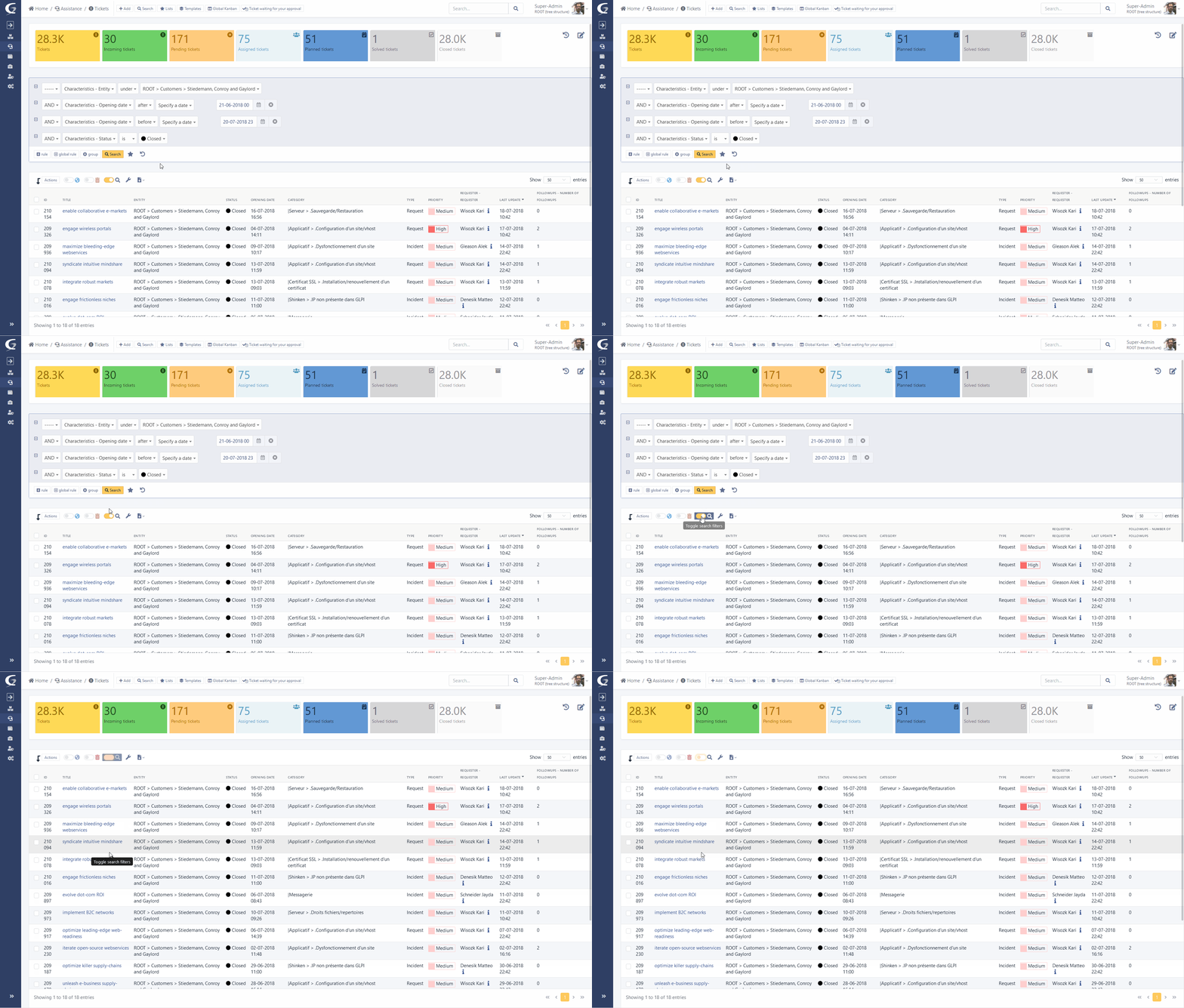
The display of the search engine is now launched in “AJAX” mode. A loading icon is displayed when starting a search, changing pages or sorting. Once the new results are available, only the content is replaced and not the entire page.
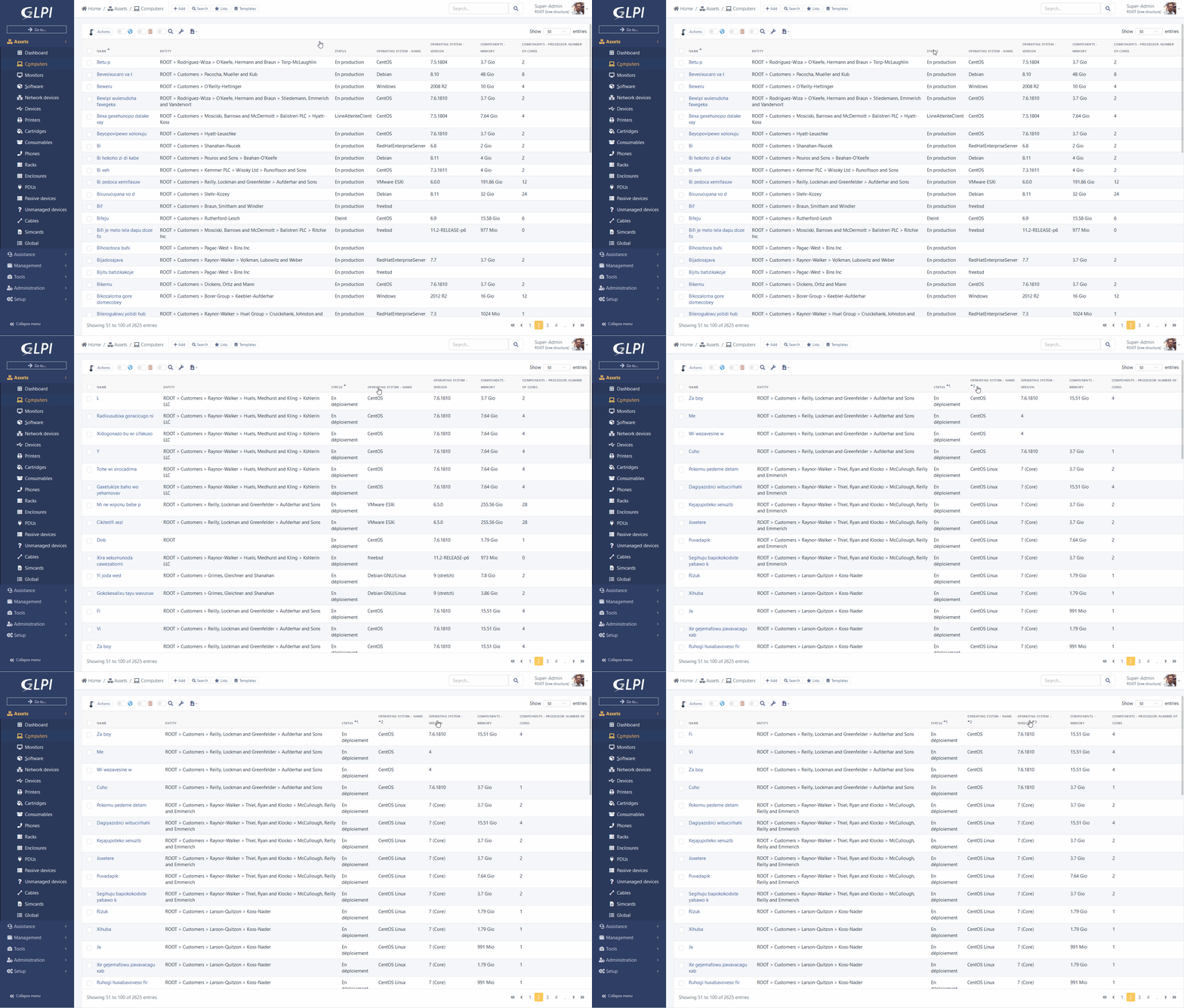
With a “ctrl” you can add several sorts on the columns of your search results.
Example: sort by “Name” and by “Date modified”.
The main element form now displays a panel on the right recalling the images associated with the corresponding model.
These images were previously used only in the display part of data center racks, they are now available everywhere.
With the arrival of new libraries tabler and Bootstrap 5, it is now much easier to create and modify the palettes defining the colors of GLPI.
Here is sample palette file corresponding to the screenshot below:
2 new dark palettes are also available:
The display and use of ITIL objects (Tickets, Issues and Changes) were redesigned.
Many changes were made:
The user who asked the question will be added as an observer of the object and a notification will be sent to him personally.
A new notification (and a corresponding event) named “New user mentioned” is added to your GLPI instance.
You can now define the timeline for a follow-up.
In addition, an automatic reminder after a certain period and with recurrence can be defined in order to warn participants that a response from them is expected. It is also possible to plan an automatic resolution after a certain number of reminders.
This display mode previously only available in projects, is now accessible from the Helpdesk via dedicated icon next to the breadcrumb.
You can add columns corresponding to the statuses.
Attention, even if the “Closed” status is available, we will not display the relative data in order to prevent the execution time from taking too long. The column remains available to accommodate the object move.
On this new page and also on the page of projects it is now possible to add criteria to filter the cards.
Follow-ups, tasks and solutions templates now support the addition of variables. These are replaced by their values at the time of their use. For example, it is possible to use {{ticket.id}} in a template and when choosing the template in a follow-up, the variable is replaced by the ID of the current ticket.
Integrated documentation is available to know all the variables available.
We now support automatic inventory directly in GLPI.
A new REST API will be available (directly in the GLPI index) to receive inventory files in historical xml format or via the new json format.
We therefore maintain compatibility with previous agents (it will just be necessary to reconfigure the server URLs of historical agents, or to set up a web proxy to redirect to the new URL).
We now manage with this new format most of the GLPI inventory objects, such as telephones, applications, racks, etc.
This code now allows you to receive partial inventories.
This consists of sending only part of the information related to the object concerned, and indicating to the server, with a key, to update only the data concerned.
Transporting, processing, inserting and updating data is done significantly faster.
This new agent (bifurcating since version 2.6 of the fusioninventory project) has been enhanced with several new features:
You can get the archives for your systems at the following address: https://github.com/glpi-project/glpi-agent/releases
Nightly build packages are also available to get the latest developments: https://nightly.glpi-project.org/glpi-agent/
We also provide a perl script (see documentation dedicated) allowing to install the agent on your linux with a suitable package (rpm, deb, snap.)
The documentation is available and details of the installation, use and configuration of this new agent.
Some screenshots to illustrate the ToolBox interface of this new agent:
The android agent is back on the google play store. It supports versions 4 to 10 of the OS.
For customers under subscriptions we have also added the possibility of configuring the server URL via a “Deeplink”. Via QRCode, the agent automatically retrieves the configuration to connect to the server.
As seen above, GLPI now includes the basic brick for automatic inventory.
However we have not yet resumed the advanced tasks allowed by the previous projects.
Here are the points about these tasks:
For these last two features, two temporary scenarios are possible:
This package is transitional and the integration of these modules is planned in our roadmap, the complete package is expected in a few months.
We have started the work on developing the remote deployment module. In addition to its integration into the core of GLPI, a temporary community plugin will be made available to use the functionality before the next major version of GLPI.
We will continue SNMP and ESX functionality in the same way during the year: support available in the next major release, and community plugin for beta testing of the functionality.
Contribution of Fian services and Smartwood, the old Gantt view has been refreshed by integrating the library DHTMX Gantt.
This change also brings an interactivity of the view (possibility to create/modify/move tasks).
Material (items) reservations now use the same library (fullcalendar) as GLPI planning.
From the preferences, it is now possible to choose for the rich text fields (html), the layout of the integrated toolbar:
In the settings it is now possible to choose for the rich text fields (html), the layout of the integrated toolbar:
The “embedded” layout displays a contextual embedded toolbar to the right of your cursor.
Selecting text will bring up other options such as bold or italic.
Other less common options (source code, full screen, etc) will be available via right click.
The plugin databases previously carried by Infotel is now directly integrated (Management menu) thanks to their help.
A migration script to recover data from the old plugin is available from the command line console.
These two objects now can be linked, tabs have been added to them.
A new cable object is now added to the Assets menu.
It is used to represent the physical link between the ports of two inventory objects.
New prerequisites:
If you are ready to try it, download the final version here:
At Teclib´ we are happy to announce that we are expecting the release of GLPI 10 in the following weeks. We have received many questions related to migration from older versions of GLPI/compatibility of plugins and decided to publish a dedicated video. Watch it on Youtube or read the transcription below.
You can migrate to version 10 from any GLPI version (we support migrations from at least 0.80 version), all data, like users, tickets or assets, will be transferred.
The server must have at least PHP 7.4 and MySQL 5.6 dependencies. If your server doesn’t have these, you must upgrade these requirements.
No data loss is expected, but as usual, make backups (files and database) and/or snapshots.
You will need to execute some optional migrations after GLPI main update with the help of the console.
If you have custom developments or core changes, please note they will be erased when copying the files. Consider porting them before the migration.
All plugins listed in GLPI Network Subscriptions (both Community and Exclusive ones) will be compatible with GLPI 10.
Check https://plugins.glpi-project.org/#/version/~~10.0.0/plugins for a community based list.
In addition to the small gain of not using a plugin, the feature will use less history data and database storage (for example, software updates take 1 line instead 2).
We worked also on user experience, you have now assets separated by types for a more comfortable setup.
It unlocks some features like partial inventories, which reduces performances footprint.
More asset types are available for inventory (you can send files for racks, appliances, certificates, etc).
In combination with GLPI agent, you also obtain some great features:
Our professional support for on-premise (GLPI Network Subscriptions) covers support L.3 for migration from GLPI 9.5 to GLPI 10.
All GLPI Network Cloud paid customers will be upgraded for free.
A newly revealed critical vulnerability impacting Apache Log4j was disclosed and registered as CVE-2021-44228 with the highest severity rating. Log4j is an open-source, Java-based logging utility widely used by enterprise applications and cloud services. By exploiting this vulnerability, a remote attacker could take control of the affected system.
We would like to assure all users that GLPI core and its plugins, being written in PHP and not using Log4j, are not affected by the Log4Shell vulnerability.
Exploiting this vulnerability requires a Java Virtual Machine and the org.apache.logging.log4j.core.lookup.JndiLookup Java class in a vulnerable version. None of them are included or used in GLPI distributions.
We can also confirm that:
Warning: this does not prevent layers/tools potentially upstream of GLPI (reverse-proxy, firewall, etc.), or connected to GLPI, which we are not aware of in your context, from being potentially impacted.
For example, if you have a Metabase server connected to GLPI you should note that Metabase (<0.41.4) is affected by Log4j vulnerability, and you should update it ASAP!
Documentation: