To optimize, you must first measure. GLPI centralizes all your data via the GLPI Agent or standard protocols (SNMP, WinRM, SSH). Computers, servers, routers, and printers are all indexed in a single platform.
With the release of GLPI 11, management now extends to "Custom Assets": vehicles, industrial equipment, or electrical infrastructure. If an asset has a cost and requires tracking, GLPI ensures full traceability:
Discover what's new in GLPI 11
Since 2024, GLPI has been a key partner in the IEN project (Environmental Impact of Digital Technology) alongside prestigious partners such as Airbus, Afnic, and Sorbonne University. The first major milestone? GLPI Carbon. This project will continue to evolve through 2027.
This innovative plugin leverages your inventory data to calculate the carbon equivalent of your computers. By connecting to reference databases (Boavizta, RTE, Electricity Maps), it:
Integrating GLPI Carbon allows organizations to generate precise indicators for ISO 14000 and 14044 certifications. You can now estimate the Global Warming Potential (GWP) of your fleet and identify key levers to reduce your carbon footprint.
Choosing GLPI means opting for an Open Source solution built for the future, combining operational performance with Corporate Social Responsibility (CSR).
Ready to measure your infrastructure's impact? Stop letting your data sit idle in spreadsheets and move to intelligent, sustainable asset management.
The security of ITSM tools is critical, and GLPI is no exception. To protect your data and ensure the reliability of your IT environment, it is essential to keep your GLPI instance up to date. It is in this context that Orange Cyberdefense launched GLPwnMe, a project dedicated to auditing and improving GLPI’s security.
GLPwnMe, led by Orange Cyberdefense, is a tool that automates the detection of major previously disclosed vulnerabilities in GLPI. Its goal is to identify potential weaknesses in your instance before they become real risks for users.
Each GLPI update not only brings new features but also includes security patches resulting from audits such as those conducted by Orange Cyberdefense. Failing to update your GLPI instance can expose your data and systems to avoidable risks.
In our new GLPI x Orange Cyberdefense video, you will hear from:
Watch video : https://www.youtube.com/watch?v=0M37jnoJDEg
They explain how the collaboration around GLPwnMe helps strengthen GLPI’s security and why every user should update their software regularly.
💡 Updating GLPI isn’t just about new features: it’s about protecting your data, securing your IT environment, and building trust within your teams.
With the official Docker images, deploying GLPI has never been easier, whether you want to test it quickly or run it in production.
Running GLPI inside Docker brings key advantages:
This approach is designed for:
GLPI With Docker, you can run GLPI in just a few commands.
👉 For a step-by-step guide, check out our Help Center tutorial.
Docker is the fastest way to explore GLPI with minimal setup. Whether you’re testing the latest version or rolling out a stable environment in production, containers make the process smooth and reliable.
Today, IT accounts for 3 to 4% of global greenhouse gas (GHG) emissions. This figure shows that the IT sector is already one of the major contributors to climate change, and its continuous growth adds significant weight. To achieve carbon neutrality by 2050, it is essential to measure, understand, and then reduce the environmental impact of your digital infrastructure.
That’s why GLPI introduces Carbon, a plugin designed to analyze the lifecycle of your IT assets, assess their impact, and guide you toward more sustainable choices.
Here’s what the GLPI Carbon plugin allows you to do:
With GLPI Carbon, you get:
CloudInventory allows automatic and manual synchronization of resources hosted by various cloud providers (OVH, AWS, Azure, Google Cloud, etc.) into GLPI. It supports real-time discovery, cron task scheduling, API data visualization, reconciliation with GLPI assets, a summary dashboard, and integration with asset management rules.
Compatible with GLPI’s dynamic inventory via the agent, this plugin promotes centralized and consistent management of your hybrid infrastructure.
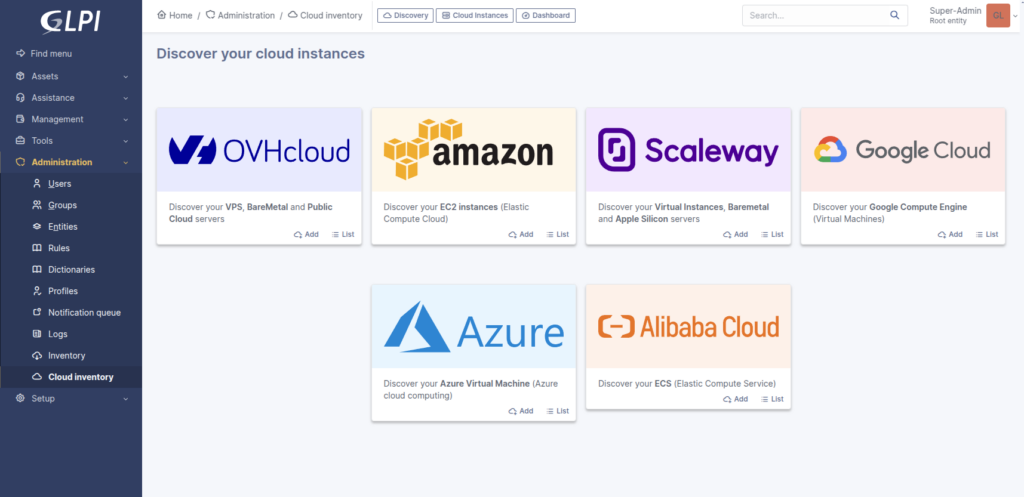
Discover the plugin at this link: https://plugins.glpi-project.org/#/plugin/cloudinventory
Explore all its benefits in the documentation: https://glpi-plugins.readthedocs.io/fr/latest/cloudinventory/index.html
We would like to announce a new exclusive GLPI Network plugin — GLPI-AI — Available at https://plugins.glpi-project.org/#/plugin/glpiai. It is now available for clients with a GLPI Network subscription (Basic, Standard, Advanced) and PHP version >= 8.1, and starting from April 22nd for all GLPI Cloud instances.
This plugin adds the ability to summarize the timeline items of tickets using the Open AI API.
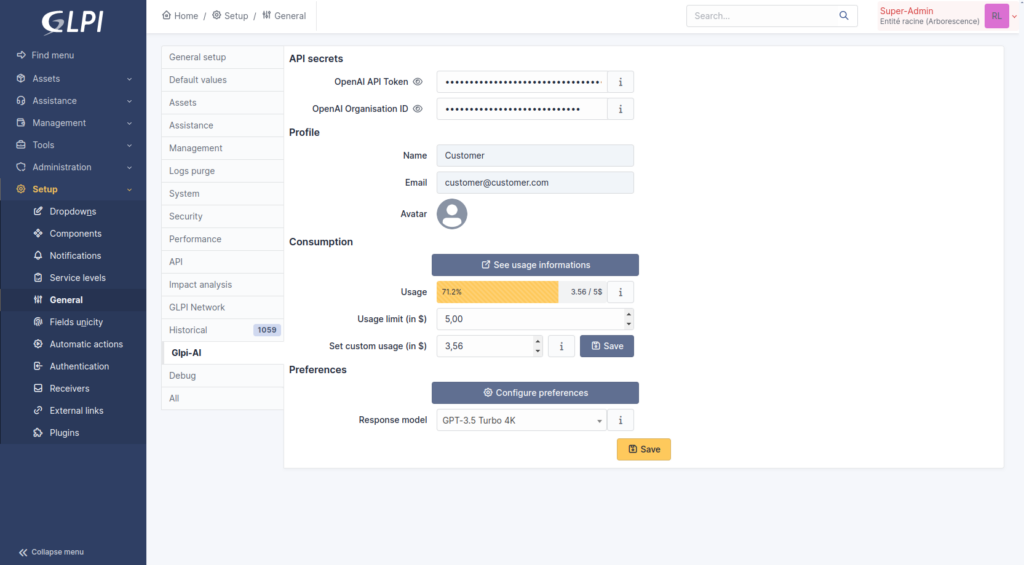
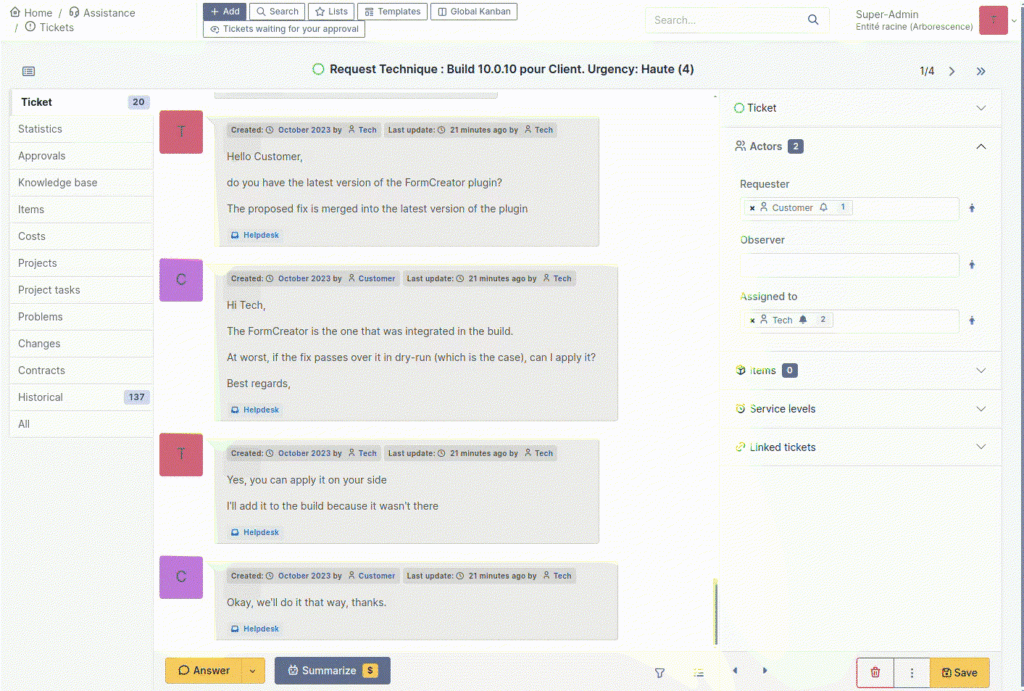
Find the documentation here: https://services.glpi-network.com/documentation/1864/file/README.md
View our brochure to find out more : https://glpi-project.org/wp-content/uploads/EN.pdf
GLPI AI is building on OpenAI

We would like to announce a new plugin — Centreon— available to all GLPI Network Cloud customers and for everyone with a marketplace registered (free tiers) !
The git repository is also open to everyone : https://github.com/pluginsGLPI/centreon
The plugin use the Centreon API to retrieve informations about hosts and display them in corresponding computers (matching the name).
The tab shows services informations with their statuses, and a timeline of events.
You can also send a few actions to the distant server like:
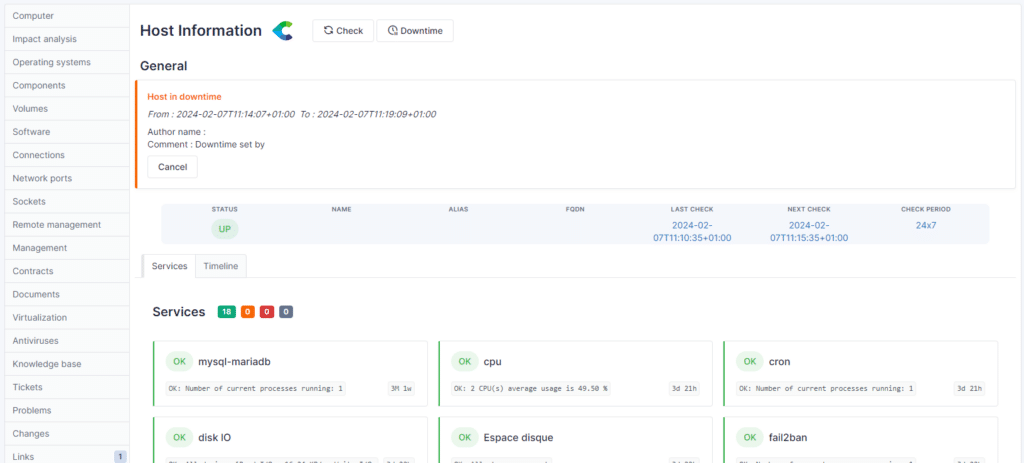
This is the first version of the plugin and we will continue to work on it and deliver more features (metrics, widgets for our dashboards, listing of all services, etc) soon.
Important announcement for the GLPI community regarding our GLPI Network Cloud offerings! We have decided to streamline our GLPI Network Cloud offers!
⚠️ GLPI Network Public Cloud remains unchanged (starting from 1 user, €19/user/month).
⚠️ Private Basic Cloud is now "Private Cloud" (starting from 25 users, €21/user/month).
⚠️ We no longer offer Private Advanced Cloud! Please contact us for a customized solution if you have more than 100 users!
We invite you to check out our new offers on our official GLPI Network Cloud website: https://glpi-network.cloud/prices/
For any questions or if you need a customized quote, feel free to contact us!
Collecting inventory data from servers, network devices, and workstations across your company is a challenging task. Initially, this process requires installing agents on every computer. However, there are common obstacles. Perhaps internal policies prevent agents from being installed on all servers, or there's no centralized installation method. Sometimes, networks are isolated, making it impossible to connect to your GLPI server, or you might simply need to collect data remotely from your network.
Additionally, consider the scenario where data collection is necessary from network devices and printers. This is where the GLPI Agent becomes invaluable. Since its 1.6 version, the GLPI Agent includes a Toolbox plugin. This plugin significantly expands your capabilities, allowing for network discovery and inventory of network devices using SNMP. It also facilitates remote data collection of hosts: Windows through WinRM, Linux via SSH, and ESXi.The beauty of the GLPI Agent lies in its versatility - all these functions are integrated into a single agent, simplifying what was once a complex and multifaceted task.All you need before starting is:
a. If you have many VLANs or want to segment the scans between tasks, you can separate the ranges following your company policies4. The list of SSH, WinRM and SNMP credentials with administration permissionsThe toolbox is not intended to be installed on insecure networks.
After we've gathered all this information, You can follow these steps contained in the video below:
a. You will need just the 4 menus that are on the documentation:i. Credentialsii. Inventoryiii. IP Rangesiv. Scheduling3. Create the IP ranges you want to discover and inventory devices remotely4. Register the SNMP credentials of your devices5. Register the SSH credentials of your devices6. Register the ESXi credentials - if you have them7. Create the scheduling you want GLPI Agent to run - if you want to do it recurrentlya. Even if you want the task to be run just once, we must create a schedule to add to the task8. Create an Inventory taska. If you set a huge network, you need to be aware that more time will be needed for the agent to finish its job.b. threads is the number of remote devices the task will query for at the same time.i. This can be set higher to make more requests at the same time and keep the task running in a shorter time.ii. The value must be reasonable, and the right value can depend on the resources allocated to the agent.c. timeout is the number of seconds before the agent will decide a remote device is not responding.i. On a local network with devices responding quickly, it can probably be set to 1 second.ii. On devices located behind a far network or if devices can be overloaded, this may require a higher value.iii. When have SSH authentication is included, 10s is better, so the agent can wait for the device to respond.9. Run the taska. If you activate the debug of the agent to the ID 2, which is the most complete debug mode, you will be able to watch each tentative of the agent to connect to each IP of the range.In this scenario, we are collecting just information about SNMP equipments, and Linux instances using SSH. For this lab and video, we are not collecting Windows information, even though it is possible if you enable WinRM connections from the host containing the GLPI Agent Toolbox and registering a WinRM credential to the configuration of the agent.
https://glpi-agent.readthedocs.io/en/latest/tasks/remote-inventory.htmlhttps://glpi-agent.readthedocs.io/en/latest/plugins/basic-authentication-server-plugin.htmlhttps://glpi-agent.readthedocs.io/en/latest/plugins/ssl-server-plugin.htmlhttps://glpi-agent.readthedocs.io/en/latest/plugins/toolbox-plugin.html#setupGLPI Agent Toolbox
We would like to announce a new plugin — Unread — available to all GLPI Network Cloud customers and via our professional offers starting on the Basic GLPI Network Subscription (on-premises) and above !
This plugin helps you to keep track of unread messages while you were offline and don’t want to miss ant messages that could have be sent, and you should be aware of.
The plugin adds a new notification bell in the top right corner so you can keep track of everything you need to. This notification bell list all your unread messages.
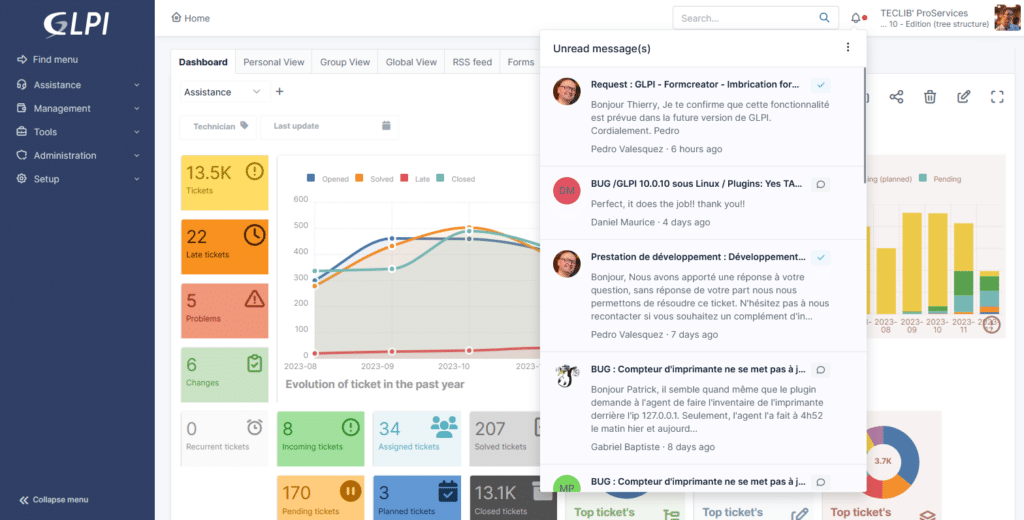
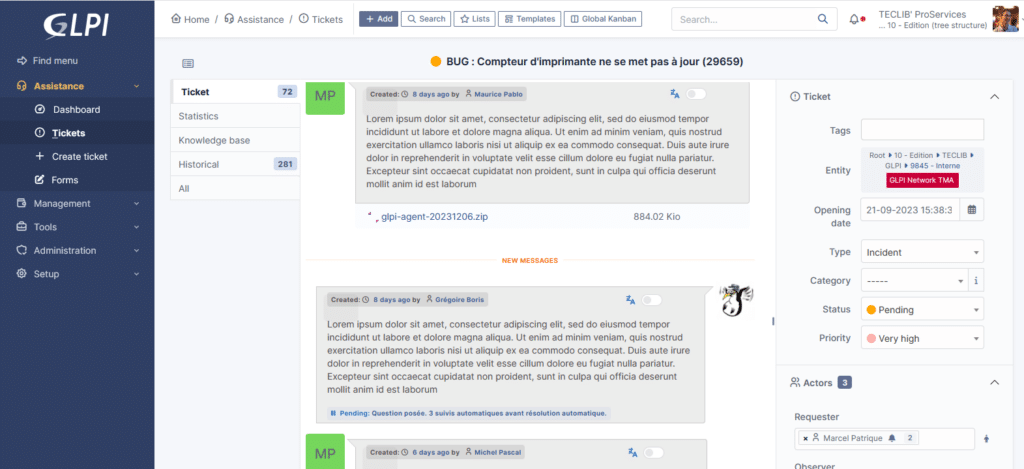
The timeline indicator adds a line below the last item you have read on THE tickets’ timeline. So now it’s possible to come back to work knowing exactly where you stopped before.
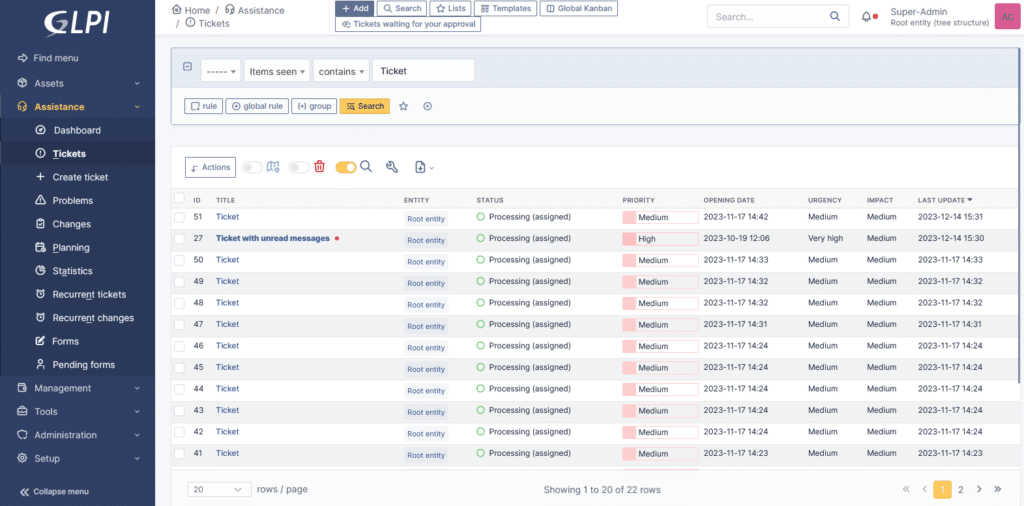
When you open the ticket list, all the tickets with unread messages are highlighted, and you can choose the one you want to know more about.
Find the subscription brochure here: https://glpi-project.org/wp-content/uploads/EN.pdf
On GLPI Network Cloud: https://glpi-network.cloud/
Documentation for this plugin can be found by clicking this link: https://plugins.glpi-project.org/#/plugin/unread
You can test this plugin (and all other GLPI Network plugins) on your GLPI Network Cloud demo instance.