


GLPI 12 is the latest major release of the open-source ITSM solution. It introduces a completely redesigned Knowledge Base, gives administrators greater control over active user sessions, and ensures that internal deadlines automatically follow the team responsible for the work. The release also strengthens platform security, with no additional configuration required.
In this article, we explore the key improvements GLPI 12 brings to users and IT teams, as well as the essential points to consider before migrating.
What is GLPI 12?
As part of GLPI's release cycle, each major version introduces new features, enhancements, and updated technical requirements. GLPI 12 follows GLPI 11 and marks the end of support for GLPI 10.
The guiding principle behind this release is simple: bring GLPI even closer to the way teams actually work. A ticket moves from one team to another. A procedure is difficult to find. A user session remains active following an incident. GLPI 12 provides a built-in response to each of these everyday situations.
The comprehensive GLPI 12 changelog provides a detailed overview of every change. Below, we highlight the key improvements you need to know about.
O que há de novo no GLPI 12 para os usuários
A Knowledge Base completely redesigned from the ground up
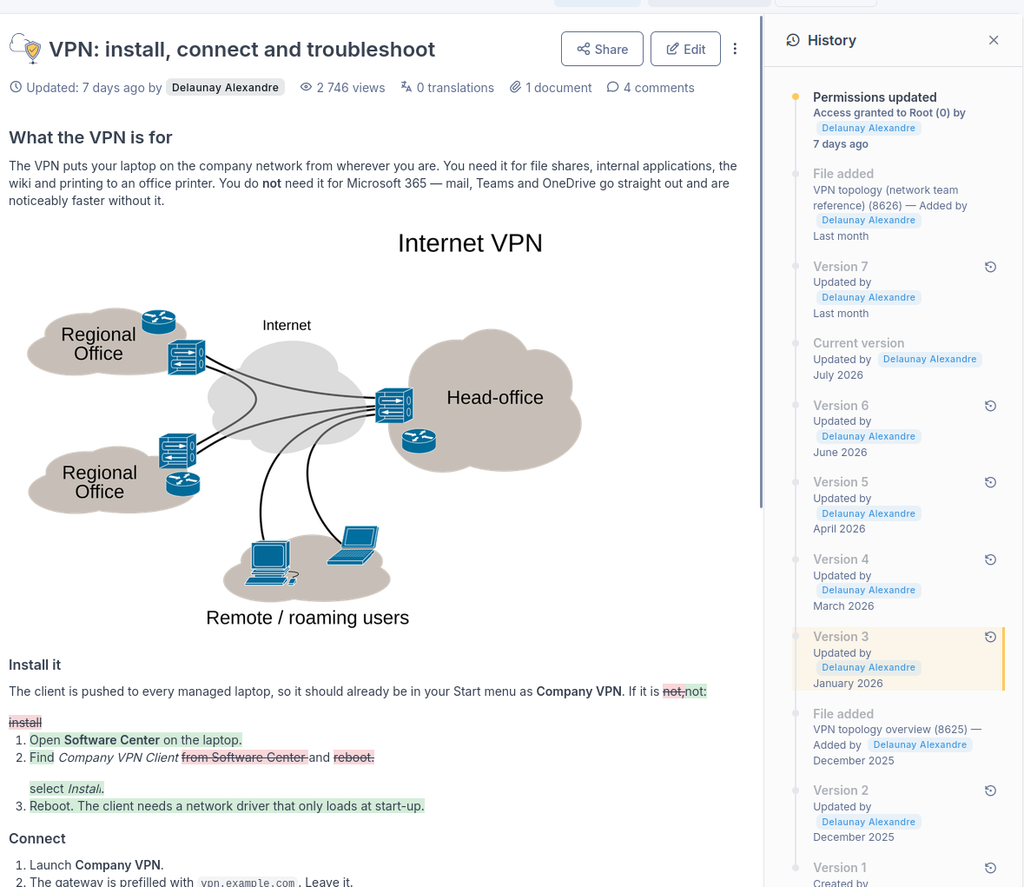
This is one of the most significant changes introduced in GLPI 12. The Knowledge Base interface has been completely rebuilt to provide a smoother and more intuitive experience. Reading and editing now take place within the same interface, eliminating the need to navigate between multiple tabs and making knowledge easier to access, manage, and maintain.
In practice: a modern editor with quick commands, an always-visible tree with favorites and drag-and-drop functionality, public article sharing, comments anchored to specific passages, version comparison, and translation directly within edit mode.
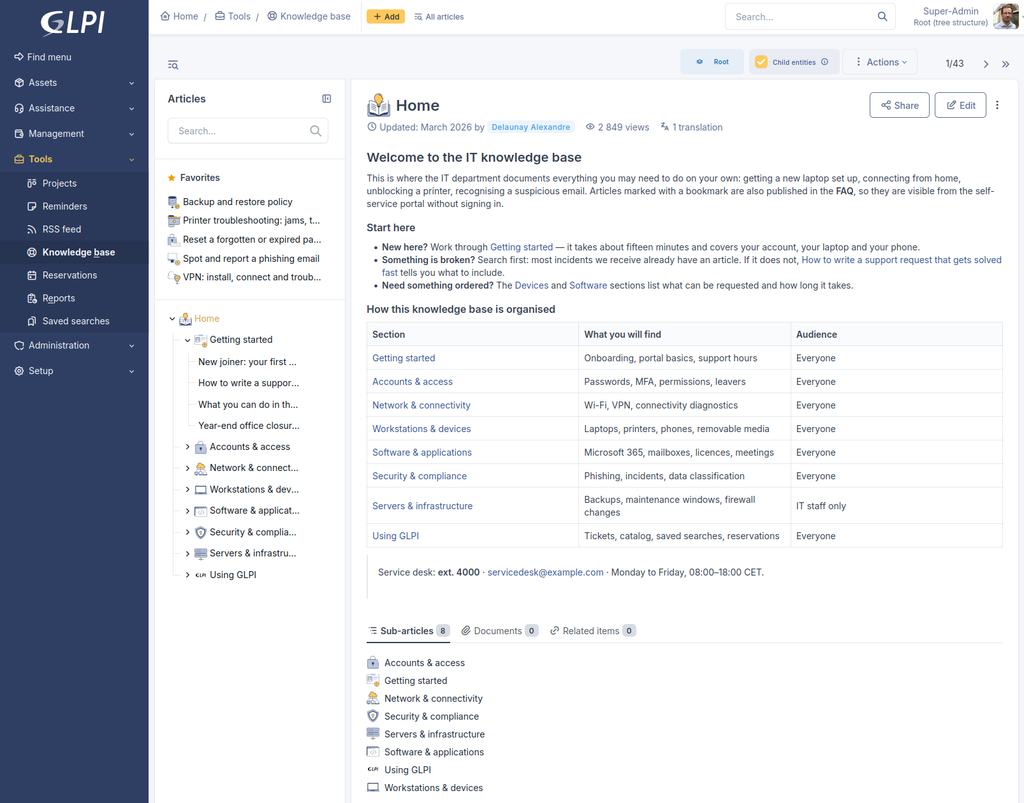
Categories are no longer used as a separate structure. Articles can now directly contain other articles, making content organization simpler and more intuitive. When upgrading, existing categories are automatically converted into articles, and their visibility settings will need to be configured again.
A more precise helpdesk
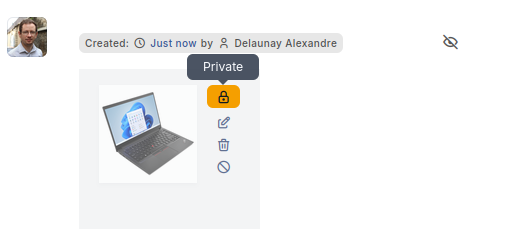
Documents attached to tickets can be hidden from requesters, while users who are replaced on a ticket are automatically notified. Ticket search criteria can also be restricted by profile, ensuring that each user group only sees the information relevant to them.
Project tasks now include reminders, while forms allow multiple items to be added within a single question.
More comprehensive dashboards
Benefit from new filters, including entity, multiple groups or statuses, SLA, technician, and operating system, as well as new dashboard panels displaying tickets by group and status, tickets by category and entity, and computers by age. Dashboard performance has also been improved for faster display and a smoother user experience.
OLAs that follow the team, not just the ticket
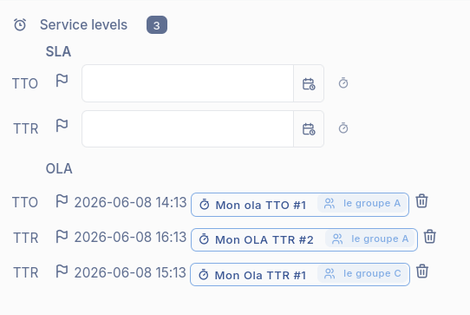
An OLA (Operational Level Agreement) defines the internal deadline commitments between IT teams. Until now, a ticket carried a single OLA timer. When a ticket moved from the network team to the workstation team and then to the applications team, the accumulated delay could ultimately fall on the last team involved.
With GLPI 12, each team involved in resolving a ticket has its own deadline and its own late status. This provides service managers with greater visibility into where time is being spent or delays occur, while ensuring that each team is measured against the commitments it actually controls. The result: greater accountability, more accurate performance tracking, and better visibility across IT service delivery.
Security: what GLPI 12 hardens
Greater control over active sessions
GLPI 12 keeps track of every active session, giving administrators clear visibility into who is currently signed in and allowing them to terminate any session instantly with a single click.
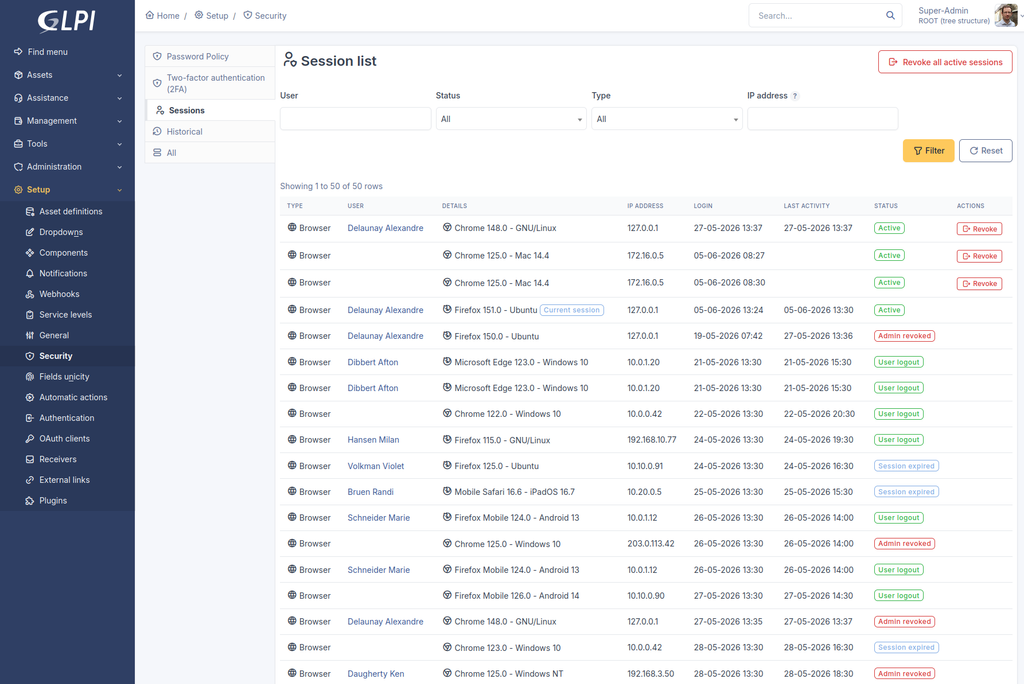
This is the answer for situations where changing a password is no longer enough: a lost or stolen laptop, a password exposed in a data breach, or a compromised integration. Until an active session is revoked, it remains valid.
Identity confirmation for sensitive actions
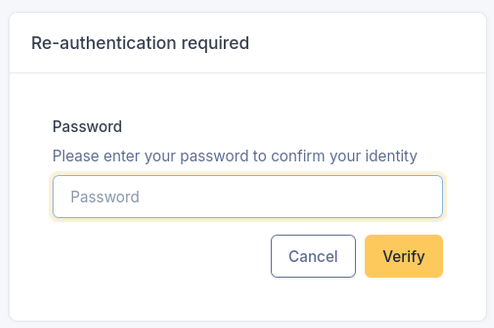
Some sensitive administrative actions now require additional identity confirmation, even when you are already signed in. Simply verify your identity using a two-factor authentication code, with your password available as a fallback. For organizations requiring separation of duties, this security principle is built directly into the product, helping strengthen access control and protect critical administrative actions.
Protections enabled by default
Requests from the GLPI server to the internal network are blocked by default, unless explicitly authorized, helping to prevent potential pivot attacks. When enabling inventory, users are now prompted to select an authentication method. It is still possible to proceed without authentication, but this option must be explicitly selected and is clearly flagged by GLPI as not recommended. The underlying technical foundation has also been strengthened, with consistent protection applied across all database access.
Centralized privacy settings
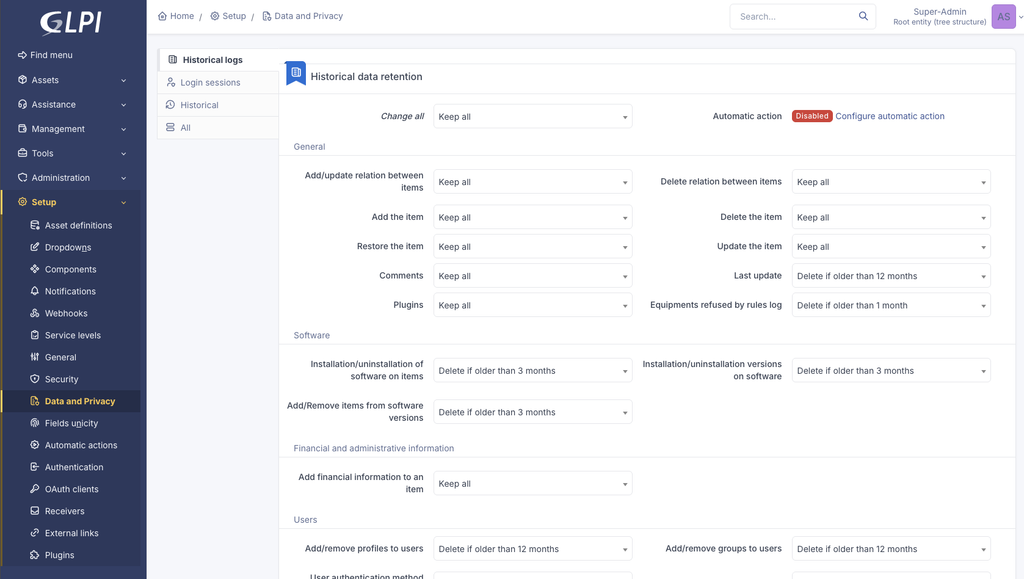
Security and privacy settings are now easier to access and manage. A dedicated Security menu brings together password policies and two-factor authentication (2FA), while the Data and Privacy menu centralizes data retention and purge rules. For GDPR management, everything you need is now conveniently available in one place.
Integrations, accessibility and documentation
API. GLPI 12 introduces version 3 of the High-Level API, running alongside previous versions. Your existing integrations remain fully operational, giving you the flexibility to migrate to the new API when you are ready.
Accessibility. GLPI 12 takes an important first step toward meeting RGAA and RAWeb accessibility criteria, with improvements to keyboard navigation, page structure, contrast, and screen reader compatibility. This work will continue across future releases. For organizations responding to public sector and healthcare tenders, these improvements provide concrete support for accessibility requirements.
Documentation. The GLPI user documentation has been completely rewritten to provide a clearer and more accessible experience. It now includes a Quick Start section, interactive demos, and comprehensive documentation in French, helping users get started and make the most of GLPI more easily: help.glpi-project.org.
What to check before migrating to GLPI 12
A major release may introduce changes to existing configurations. Before upgrading to GLPI 12, we recommend checking the following eight key points to ensure a smooth migration.
- Knowledge base: Existing categories will remain hidden until an administrator grants the appropriate access rights again.
- Plugins: Plugins must be compatible with GLPI 12. Make sure to check the compatibility of each plugin before starting the migration.
- Monitoring: Tools used to monitor the status of automatic actions must be updated to support the new format.
- System requirements: Requires a minimum of PHP 8.3 and MariaDB 10.11 (or MySQL 8.0).
- Reverse proxy: An additional declaration must be added to the configuration.
- Internal feeds: RSS feeds, calendars, and webhooks pointing to internal servers are blocked by default and must be explicitly authorized.
- Inventory: Enabling inventory now requires you to select an authentication method. Running inventory without authentication remains possible, but this option must be explicitly selected.
- OLA reports: Any custom reports that rely on OLA data must be rebuilt to ensure compatibility.
Plugin developers can find further technical details in the relevant GLPI 12 developer documentation.
How to migrate to GLPI 12?
Key steps
- Check the requirements of your target environment before starting the migration.
- Review your plugins, internal integrations, custom reports, and monitoring tools, and validate their compatibility against the eight points outlined above.
- Set up a test environment using a copy of your production instance and test your most frequently used processes.
- Plan the reassignment of Knowledge Base permissions immediately after the upgrade.
- Migrate your production environment during a scheduled maintenance window, with a complete backup and a fully tested rollback procedure in place.
Getting help with your migration
GLPI is open-source software and can be used without a license. A GLPI Network subscription, whether deployed on your own infrastructure or through GLPI Network Cloud, provides direct support and expertise from the official publisher. This can be complemented by the expertise of an integration partner, who can support your migration project, including carrying out a pre-migration audit to help ensure a smooth and secure transition to GLPI 12.
Frequently asked questions
Is GLPI 12 compatible with my current plugins?
Plugins must be adapted to ensure compatibility with GLPI 12. GLPI Network plugins are ported to the new version. For community or in-house plugins, we recommend checking compatibility with their respective maintainers and testing them before migrating.
What happens to my knowledge base categories?
Your existing knowledge base categories become articles, with their previous content converted into sub-articles. They remain invisible until an administrator assigns the appropriate access rights, which are then inherited by their content.
Minhas integrações via API vão continuar funcionando?
Yes. Previous API versions remain available and can continue to be used. API v3 is only used by new integrations that specifically request it.
What happens to GLPI 10?
Following the release of GLPI 12, GLPI 10 is no longer supported, except for customers who have subscribed to GLPI Network Extended Support. Organizations still running GLPI 10 should therefore plan their migration to GLPI 11 or GLPI 12.
Where is the full list of changes?
In the comprehensive GLPI 12 changelog and on the GitHub releases page.
GLPI 12 in brief
GLPI 12 modernizes the knowledge base, gives administrators greater control over user sessions, ensures internal deadlines follow the teams responsible for them, and strengthens security by default. It also introduces a new API version, initial accessibility improvements, and fully revised documentation.
To prepare for migration, eight key points should be reviewed, with particular attention to knowledge base visibility and plugin compatibility. With a dedicated test environment and, when needed, the support of a GLPI Network partner, migrating to GLPI 12 can be planned and managed with confidence, following the best practices of any major upgrade project.

