



Discover new interface
The main news of this version is a complete redesign of the interface and the user experience. The latest overhaul, dating back to version 0.90 was released in October 2015.
Based on tabler, Bootstrap 5 and Twig, this novelty brings many visual changes.
The integration of these standard libraries will make it easier to develop new interfaces and above all provides a “responsive” display mode that is easier to maintain.
Here are some screenshots to give you a preview:
We also have made a certain number of improvements of the user experience within GLPI. Without getting into the details, here is the list of key points.
We hope you enjoy these changes.
Vertical menu
As you may have noticed with the previous captures, GLPI has now a default layout with a vertical menu on its left. If you still prefer a layout similar to previous versions (named Horizontal) you can find it in the the user preferences.
Now t is possible to collapse the menu in order to have a compact display.
Button “Go to…”
Present since version 9.2 of GLPI, the “Go to” button allows a quick search of a menu. Now you can find it on top of the menu, its keyboard shortcut recalled.
Saved searches panel
The saved searches panel now is integrated to the GLPI design.
It can either be floating, as before, or pinned to pages, to be kept permanently (even during navigation).
Pinning is done on a page-by-page basis, a pinned panel for tickets will not be pinned for computers.
Note that it is now organized to present in the first tab, the saved searches corresponding to the type of object concerned: the list of tickets will display in priority order the saved searches concerning the tickets.
The second tab lists all the other searches concerning the other types of objects.
As the panel is now contextual to the type of object presented, access is via an icon named “Lists” present next to the breadcrumb.
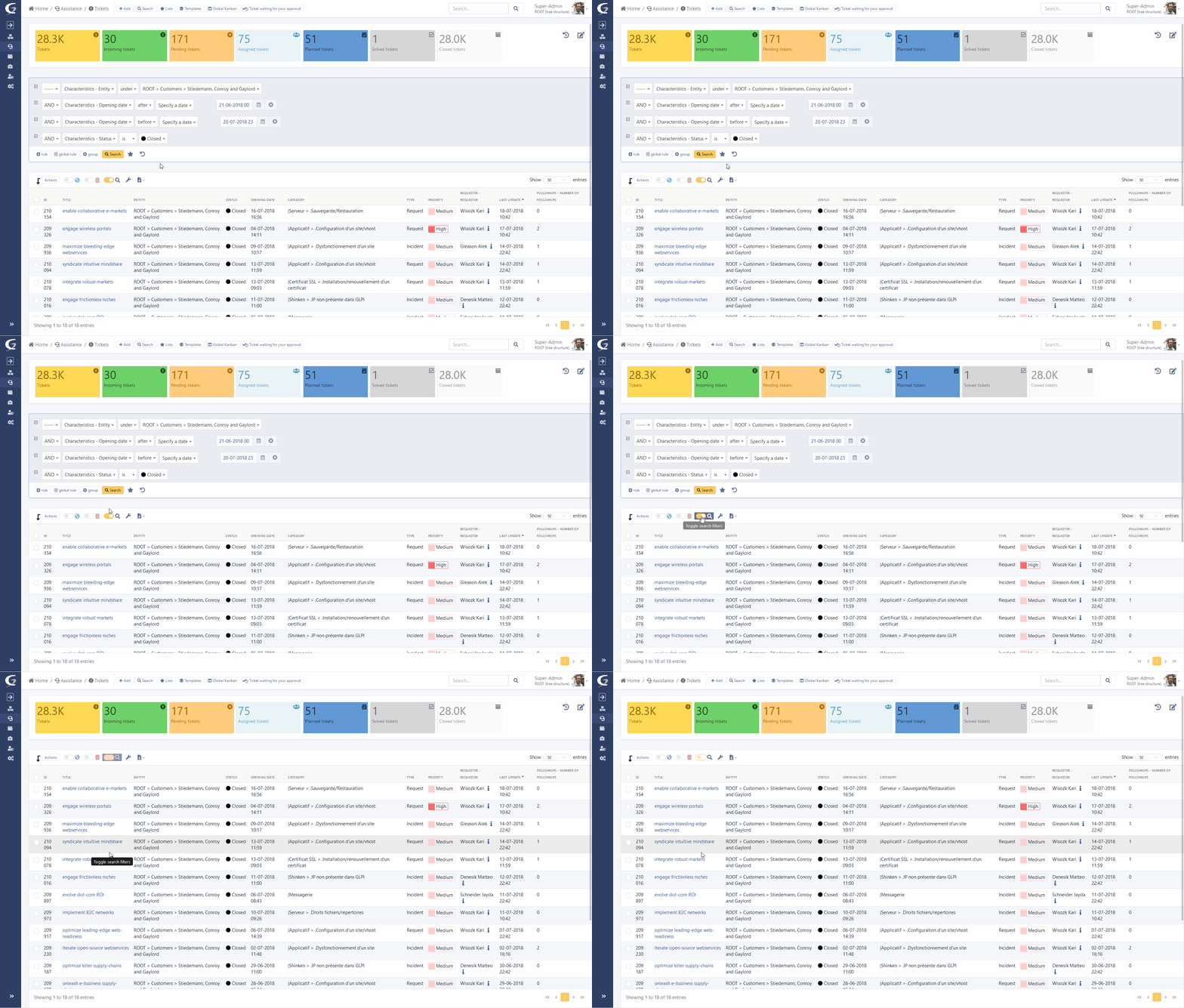
Invisible search engine
It is now possible to disable the display of the search engine.
Very practical because you can navigate in GLPI only thanks to your saved searches!
Dynamic loading of search results
The display of the search engine is now launched in “AJAX” mode. A loading icon is displayed when starting a search, changing pages or sorting. Once the new results are available, only the content is replaced and not the entire page.
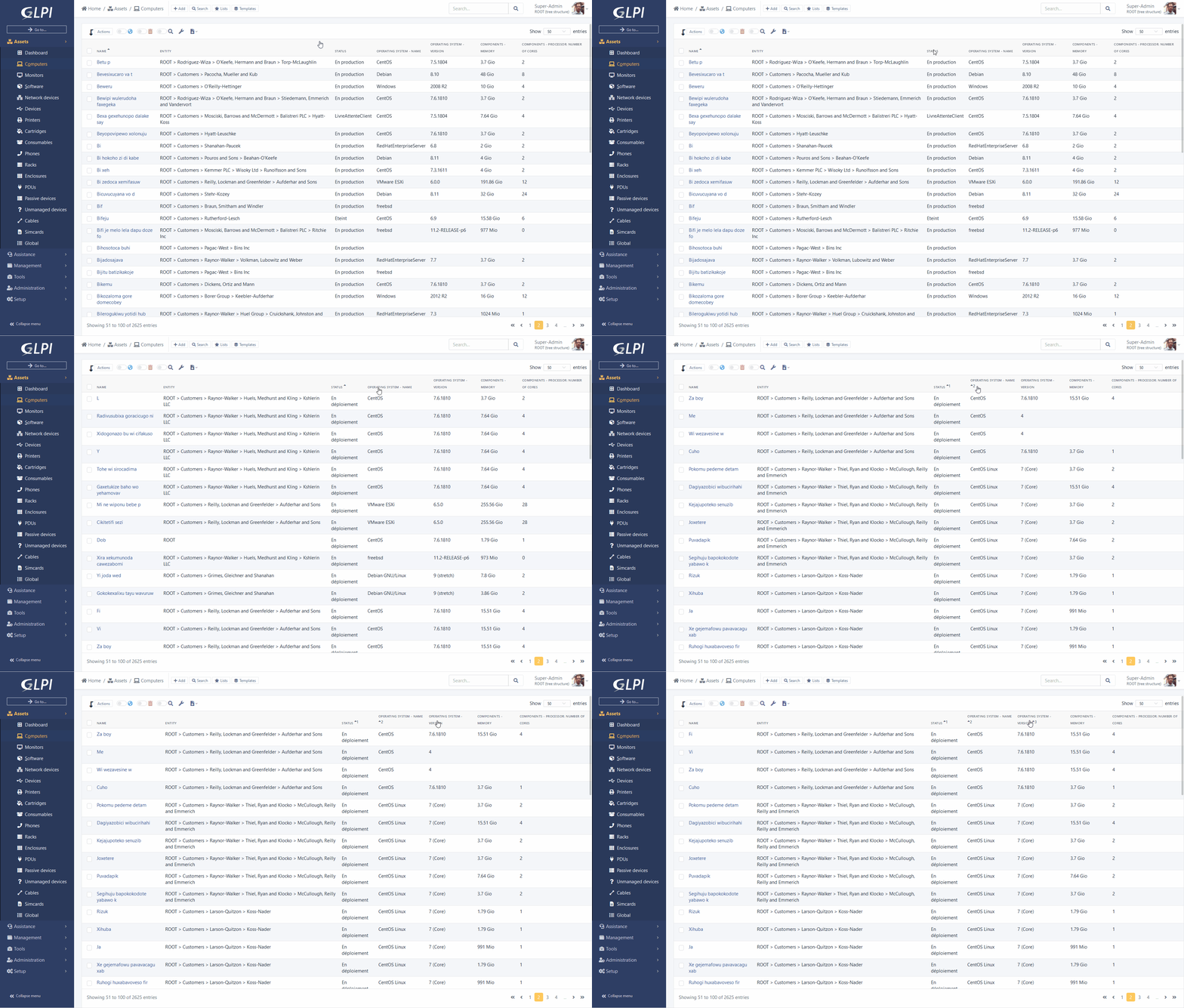
Multi-sorting of results
With a “ctrl” you can add several sorts on the columns of your search results.
Example: sort by “Name” and by “Date modified”.
Portfolio item sheet
The main element form now displays a panel on the right recalling the images associated with the corresponding model.
These images were previously used only in the display part of data center racks, they are now available everywhere.
New palettes
With the arrival of new libraries tabler et Bootstrap 5, it is now much easier to create and modify the palettes defining the colors of GLPI.
Here is sample palette file corresponding to the screenshot below:
2 new dark palettes are also available:
- Auror dark
- Midnight
Redesign of ITIL objects
The display and use of ITIL objects (Tickets, Issues and Changes) were redesigned.
Many changes were made:
- The order of messages in the “timeline” is now more natural. From oldest to newest, starting from top to bottom, we follow a usual reading order. The followup of an answer is also placed in the expected place, below the last answer.
- A side panel contains the additional information of the tickets (dates, priority matrix, actors, etc.). This panel can be enlarged or collapsed.
- Documents added to the timeline are now displayed below the parent object (track, task), in a contextual way for easier reading.
- Each of the types of actors (requesters, observers and assigned) are now displayed in a single field. Previously, several clicks were needed to select a group or a user and then choose the final actor. It is now a single dropdown unifying all possible objects (differentiating them with an icon) and providing autocompletion.
- A button at the bottom of the main view allows you to switch to a “TODO list” view displaying the tasks and validation requests in an interactive vertical list, allowing you to follow the progress of a ticket (or another ITIL object)
- From ITIL objects and their sub-objects (follow-ups, tasks), you have the option of “mentioning” a specific user from the text field.
The user who asked the question will be added as an observer of the object and a notification will be sent to him personally.
A new notification (and a corresponding event) named “New user mentioned” is added to your GLPI instance.
Follow-ups
You can now define the timeline for a follow-up.
In addition, an automatic reminder after a certain period and with recurrence can be defined in order to warn participants that a response from them is expected. It is also possible to plan an automatic resolution after a certain number of reminders.
Kanban for Helpdesk
This display mode previously only available in projects, is now accessible from the Helpdesk via dedicated icon next to the breadcrumb.
You can add columns corresponding to the statuses.
Attention, even if the “Closed” status is available, we will not display the relative data in order to prevent the execution time from taking too long. The column remains available to accommodate the object move.
On this new page and also on the page of projects it is now possible to add criteria to filter the cards.
Twig variables in Helpdesk templates
Follow-ups, tasks and solutions templates now support the addition of variables. These are replaced by their values at the time of their use. For example, it is possible to use {{ticket.id}} in a template and when choosing the template in a follow-up, the variable is replaced by the ID of the current ticket.
Integrated documentation is available to know all the variables available.
Native inventory
We now support automatic inventory directly in GLPI.
A new REST API will be available (directly in the GLPI index) to receive inventory files in historical xml format or via the new json format.
We therefore maintain compatibility with previous agents (it will just be necessary to reconfigure the server URLs of historical agents, or to set up a web proxy to redirect to the new URL).
We now manage with this new format most of the GLPI inventory objects, such as telephones, applications, racks, etc.
This code now allows you to receive partial inventories.
This consists of sending only part of the information related to the object concerned, and indicating to the server, with a key, to update only the data concerned.
Transporting, processing, inserting and updating data is done significantly faster.
GLPI Agent Desktop / Server
This new agent (bifurcating since version 2.6 of the fusioninventory project) has been enhanced with several new features:
- A new autonomous interface (named Toolbox) allowing the configuration of network discoveries and inventories.
- An improved proxy mode to allow the reporting of inventories from remote networks.
- Remote inventory support (agentless), currently with support for WinRM (windows) and SSH (Linux/Unix) protocols.
- The inventory of database servers.
- A new exchange protocol with the GLPI server in JSON format supporting partial inventory.
- Soon, the management of remote inventory tasks, including for ESX queries.
- Improved windows support including MSI packages.
- Native support for MacOSX Big Sur and new Apple Silicon M1 chips.
You can get the archives for your systems at the following address: https://github.com/glpi-project/glpi-agent/releases
Nightly build packages are also available to get the latest developments: https://nightly.glpi-project.org/glpi-agent/
We also provide a perl script (see documentation dedicated) allowing to install the agent on your linux with a suitable package (rpm, deb, snap.)
The documentation is available and details of the installation, use and configuration of this new agent.
Some screenshots to illustrate the ToolBox interface of this new agent:
Android GLPI agent
The android agent is back on the google play store. It supports versions 4 to 10 of the OS.
For customers under subscriptions we have also added the possibility of configuring the server URL via a “Deeplink”. Via QRCode, the agent automatically retrieves the configuration to connect to the server.
Advanced Tasks
As seen above, GLPI now includes the basic brick for automatic inventory.
However we have not yet resumed the advanced tasks allowed by the previous projects.
Here are the points about these tasks:
- Network discovery and inventory: now configurable independently by the GLPI agent via its Toolbox interface.
- ESX polling soon supported by this same interface
- Collection (WMI, files, registers): not supported.
- Remote deployment: not supported.
For these last two features, two temporary scenarios are possible:
- First of all, keep the previous plugin (if this one is updated)
- Use our transition package. A fork of the FusionInventory plugin (GLPI inventory plugin) will be available. It redirects inventories to the native part of GLPI and keeps advanced tasks.
This package is transitional and the integration of these modules is planned in our roadmap, the complete package is expected in a few months.
We have started the work on developing the remote deployment module. In addition to its integration into the core of GLPI, a temporary community plugin will be made available to use the functionality before the next major version of GLPI.
We will continue SNMP and ESX functionality in the same way during the year: support available in the next major release, and community plugin for beta testing of the functionality.
Refreshing GANTT views of projects
Contribution of Fian services and Smartwood, the old Gantt view has been refreshed by integrating the library DHTMX Gantt.
This change also brings an interactivity of the view (possibility to create/modify/move tasks).
Refreshment of reservations
Material (items) reservations now use the same library (fullcalendar) as GLPI planning.
Rich text improvements
From the preferences, it is now possible to choose for the rich text fields (html), the layout of the integrated toolbar:
In the settings it is now possible to choose for the rich text fields (html), the layout of the integrated toolbar:
The “embedded” layout displays a contextual embedded toolbar to the right of your cursor.
Selecting text will bring up other options such as bold or italic.
Other less common options (source code, full screen, etc) will be available via right click.
Adding databases
The plugin databases previously carried by Infotel is now directly integrated (Management menu) thanks to their help.
A migration script to recover data from the old plugin is available from the command line console.
Link between contracts and tickets
These two objects now can be linked, tabs have been added to them.
Cable management
A new cable object is now added to the Assets menu.
It is used to represent the physical link between the ports of two inventory objects.
Various dashboards
- the filters are now stored in the database, and are therefore passed on from one browser to another (We previously used browser storage for this).
- a dashboard can now be set as private
Miscellaneous Inventory
- Ability to add PCI/USB vendors (dropdown)
- Added “Camera” device
- Automatic action to remove software versions without installation
- Automatic action to remove software without versions
Miscellaneous Support
- Added management of recurring changes
- Rich text for validations
- Option to anonymize technicians / groups in the simplified interface
- Addition of a search criteria “Myself” (attributed to)
- Observers can now add a follow (new dedicated profile right)
- New massive action to link multiple tickets to an issue
- Business rules: action to add a task (from a template)
- Business rules: action to assign an “Application”
- Business rules: action to modify the global validation status
- Business rules: “Validation” criterion
Various
- Ability to modify the criteria of a saved search
- Support for authentication with CERT/KEY file for LDAPS
- Added an option to set the timeout on LDAP authentications
- Improved system:status command in CLI console to:
- filter the services to be monitored
- configure the return format (plain-text format/json)
- Report of the same modifications on the status.php page
- Added a button to clear a user’s sync field
- Button to copy search results (“Name” column only) to clipboard
- Massive actions on old plugins page
- Ability to export the results of the “History” tab in CSV format
- Removal of the “All” tab
- API: addition of massive actions
Compatibility
New prerequisites:
- PHP >= 7.4
- MySQL >= 5.6 or MariaDB >= 10.2
If you are ready to try it, download the final version here:

