| GLPI | Fusion | Agent Config |
|---|---|---|
| 9.2.x | 9.2+x | 1.0 |
| 9.3.x | 9.3+x | 1.0 |
| 9.4.x | 9.4+x | 1.0 |
| 9.5.x | 9.5+x | 1.1.0 |
| 10.0.x | N/A | 1.2.0 |
| Release link | Release link | GLPI Network Subscription |
You can download the app from Google Play!
The main news of this version is a complete redesign of the interface and the user experience. The latest overhaul, dating back to version 0.90 was released in October 2015.
Based on tabler, Bootstrap 5 and Twig, this novelty brings many visual changes.
The integration of these standard libraries will make it easier to develop new interfaces and above all provides a “responsive” display mode that is easier to maintain.
Here are some screenshots to give you a preview:
We also have made a certain number of improvements of the user experience within GLPI. Without getting into the details, here is the list of key points.
We hope you enjoy these changes.
As you may have noticed with the previous captures, GLPI has now a default layout with a vertical menu on its left. If you still prefer a layout similar to previous versions (named Horizontal) you can find it in the the user preferences.
Now t is possible to collapse the menu in order to have a compact display.
Present since version 9.2 of GLPI, the “Go to” button allows a quick search of a menu. Now you can find it on top of the menu, its keyboard shortcut recalled.
The saved searches panel now is integrated to the GLPI design.
It can either be floating, as before, or pinned to pages, to be kept permanently (even during navigation).
Pinning is done on a page-by-page basis, a pinned panel for tickets will not be pinned for computers.
Note that it is now organized to present in the first tab, the saved searches corresponding to the type of object concerned: the list of tickets will display in priority order the saved searches concerning the tickets.
The second tab lists all the other searches concerning the other types of objects.
As the panel is now contextual to the type of object presented, access is via an icon named “Lists” present next to the breadcrumb.
It is now possible to disable the display of the search engine.
Very practical because you can navigate in GLPI only thanks to your saved searches!
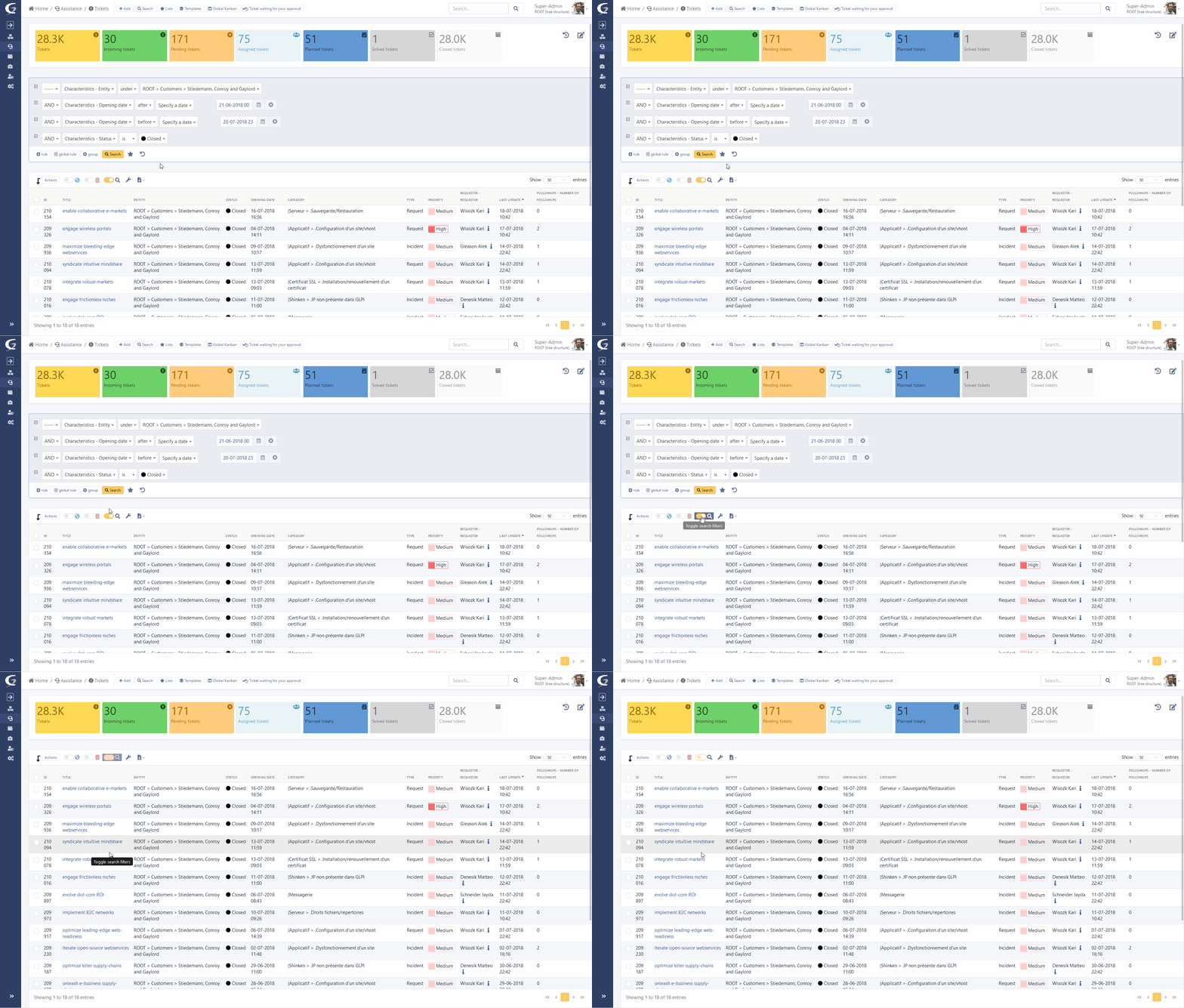
The display of the search engine is now launched in “AJAX” mode. A loading icon is displayed when starting a search, changing pages or sorting. Once the new results are available, only the content is replaced and not the entire page.
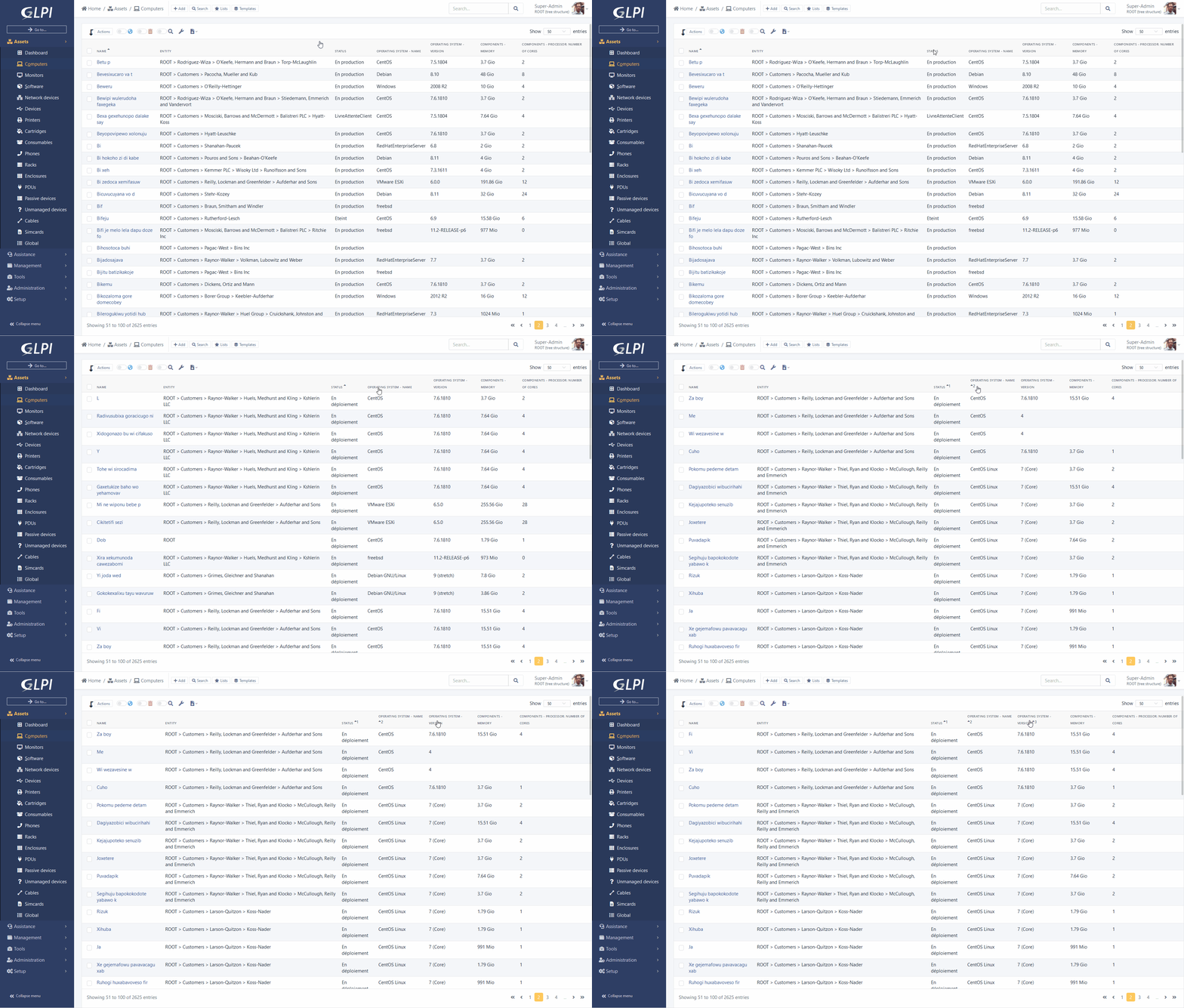
With a “ctrl” you can add several sorts on the columns of your search results.
Example: sort by “Name” and by “Date modified”.
The main element form now displays a panel on the right recalling the images associated with the corresponding model.
These images were previously used only in the display part of data center racks, they are now available everywhere.
With the arrival of new libraries tabler et Bootstrap 5, it is now much easier to create and modify the palettes defining the colors of GLPI.
Here is sample palette file corresponding to the screenshot below:
2 new dark palettes are also available:
The display and use of ITIL objects (Tickets, Issues and Changes) were redesigned.
Many changes were made:
The user who asked the question will be added as an observer of the object and a notification will be sent to him personally.
A new notification (and a corresponding event) named “New user mentioned” is added to your GLPI instance.
You can now define the timeline for a follow-up.
In addition, an automatic reminder after a certain period and with recurrence can be defined in order to warn participants that a response from them is expected. It is also possible to plan an automatic resolution after a certain number of reminders.
This display mode previously only available in projects, is now accessible from the Helpdesk via dedicated icon next to the breadcrumb.
You can add columns corresponding to the statuses.
Attention, even if the “Closed” status is available, we will not display the relative data in order to prevent the execution time from taking too long. The column remains available to accommodate the object move.
On this new page and also on the page of projects it is now possible to add criteria to filter the cards.
Follow-ups, tasks and solutions templates now support the addition of variables. These are replaced by their values at the time of their use. For example, it is possible to use {{ticket.id}} in a template and when choosing the template in a follow-up, the variable is replaced by the ID of the current ticket.
Integrated documentation is available to know all the variables available.
We now support automatic inventory directly in GLPI.
A new REST API will be available (directly in the GLPI index) to receive inventory files in historical xml format or via the new json format.
We therefore maintain compatibility with previous agents (it will just be necessary to reconfigure the server URLs of historical agents, or to set up a web proxy to redirect to the new URL).
We now manage with this new format most of the GLPI inventory objects, such as telephones, applications, racks, etc.
This code now allows you to receive partial inventories.
This consists of sending only part of the information related to the object concerned, and indicating to the server, with a key, to update only the data concerned.
Transporting, processing, inserting and updating data is done significantly faster.
This new agent (bifurcating since version 2.6 of the fusioninventory project) has been enhanced with several new features:
You can get the archives for your systems at the following address: https://github.com/glpi-project/glpi-agent/releases
Nightly build packages are also available to get the latest developments: https://nightly.glpi-project.org/glpi-agent/
We also provide a perl script (see documentation dedicated) allowing to install the agent on your linux with a suitable package (rpm, deb, snap.)
The documentation is available and details of the installation, use and configuration of this new agent.
Some screenshots to illustrate the ToolBox interface of this new agent:
The android agent is back on the google play store. It supports versions 4 to 10 of the OS.
For customers under subscriptions we have also added the possibility of configuring the server URL via a “Deeplink”. Via QRCode, the agent automatically retrieves the configuration to connect to the server.
As seen above, GLPI now includes the basic brick for automatic inventory.
However we have not yet resumed the advanced tasks allowed by the previous projects.
Here are the points about these tasks:
For these last two features, two temporary scenarios are possible:
This package is transitional and the integration of these modules is planned in our roadmap, the complete package is expected in a few months.
We have started the work on developing the remote deployment module. In addition to its integration into the core of GLPI, a temporary community plugin will be made available to use the functionality before the next major version of GLPI.
We will continue SNMP and ESX functionality in the same way during the year: support available in the next major release, and community plugin for beta testing of the functionality.
Contribution of Fian services and Smartwood, the old Gantt view has been refreshed by integrating the library DHTMX Gantt.
This change also brings an interactivity of the view (possibility to create/modify/move tasks).
Material (items) reservations now use the same library (fullcalendar) as GLPI planning.
From the preferences, it is now possible to choose for the rich text fields (html), the layout of the integrated toolbar:
In the settings it is now possible to choose for the rich text fields (html), the layout of the integrated toolbar:
The “embedded” layout displays a contextual embedded toolbar to the right of your cursor.
Selecting text will bring up other options such as bold or italic.
Other less common options (source code, full screen, etc) will be available via right click.
The plugin databases previously carried by Infotel is now directly integrated (Management menu) thanks to their help.
A migration script to recover data from the old plugin is available from the command line console.
These two objects now can be linked, tabs have been added to them.
A new cable object is now added to the Assets menu.
It is used to represent the physical link between the ports of two inventory objects.
New prerequisites:
If you are ready to try it, download the final version here:
GLPI Agent 1.2 has been released.
You’re encouraged to upgrade your GLPI agents or migrate if you’re still using FusionInventory agents.
Vous pouvez le télécharger sur le projet github GLPI Agent :
https://github.com/glpi-project/glpi-agent/releases/tag/1.2
This release includes some fixes and enhancements. Here are the most important ones:
We also introduces with this version a new solution for linux users: You can now use the AppImage GLPI Agent installer for any linux distribution supporting AppImage format.
Just check the dedicated documentation at:
https://glpi-agent.readthedocs.io/en/latest/installation/linux-appimage.htmlAs always, you can check the more detailed changelog at:
https://github.com/glpi-project/glpi-agent/blob/1.2/Changes
Major features:
See changelog for detail.
Many things has changed since the release of GLPI 10.0.0-rc2, including:
See rc2 to rc3 changelog for detail.
Report bugs: https://github.com/glpi-project/glpi/issues
Major features:
New Modern interface with Bootstrap + tabler.io + Twig
Redesign of the timeline of Helpdesk objects
Native automatic inventory
Refresh of GANTT and reservations view
Kanban in helpdesk list
See full changelog for detail.
Many things has changed since the release of GLPI 10.0.0-rc1, including:
See rc1 to rc2 changelog for detail.
Report bugs: https://github.com/glpi-project/glpi/issues
We are happy to announce the bugfixes release 2.12.5 of Formcreator. Read our blog post and check the video to get more info.
Go to changelog to see the complete list of bugfixes.
DOWNLOAD: click this link
Some weeks ago, we released a beta version for GLPI 10.0.0. Many of you have tested it and reported issues in this version, and we thank you for these reports.
Today, we release a new release candidate archive with a lot of additional fixes for this future version.
Consult the full changelog for a more complete list.
| GLPI native inventory news: GLPI Agent v.1.1 is available (bugfixes version). Click on detailed changelog to see what has been done & download the update. |
Here is a list of major issues fixed in this new release:
Download the RC archive, test the migration and the new features (you may also test the existing ones) and report us the issues you encounter on the bug tracker (tag it as [beta-10.0.0]).
Translators, please, add missing sentences of your language on transifex.
Need professional support? Check our offer on https://services.glpi-network.com/
Teclib’ is happy to announce the release of GLPI 9.5.7.
This release fixes several security issues that has been recently discovered. Update is strongly recommended!
You can download the GLPI 9.5.7 archive on GitHub.
You’ll find below the list of security issues fixed in this bugfixes version:
Voici également une courte liste des corrections de bugs importantes apportées à cette version :
Le journal des modifications complet est disponible pour plus de détails.
Nous tenons à remercier toutes les personnes qui ont contribué à cette nouvelle version et tous ceux qui contribuent régulièrement au projet GLPI !
Need professional support? Check our offer on https://services.glpi-network.com/
GLPI v.10 beta is here! You can test it both on-premise and on cloud.
Questions? Contact us! https://bit.ly/3bjCkBd
After several weeks, Teclib’ is happy to announce the release of GLPI 9.5.6.
This release fixes several security issues that has been recently discovered. Update is strongly recommended!
You can download the GLPI 9.5.6 archive on GitHub: click.
You'll find below the list of security issues fixed in this bugfixes version:
On this last issue, `HTTP_X_FORWARDED_FOR` header can be set by a client to bypass ip restriction of the REST API, we removed the parsing of this header. API Client behind proxies may be affected and loss access to API. We recommend to set the needed header (`REMOTE_ADDR`) in the web server serving GLPI.
Voici également une courte liste des corrections de bugs importantes apportées à cette version :
The full changelog is available for more details.
Nous tenons à remercier toutes les personnes qui ont contribué à cette nouvelle version et tous ceux qui contribuent régulièrement au projet GLPI !
Looking for professional support? Check our GLPI Network Subscriptions offer or try GLPI Network Cloud.